
-
-
February 28, 2019 at 4:48 pm #228204
Curt Hayos
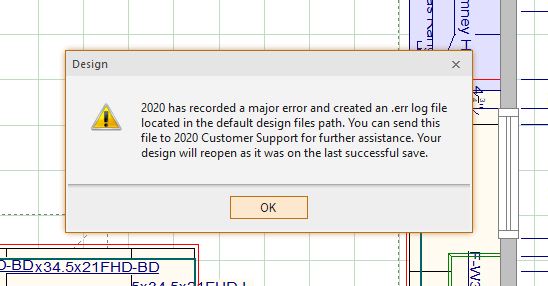
ParticipantHi All we are getting crashes upon saving since changing to 11.11.3.1 We Installed it over 11.4.1.31 to get the recovery feature but even that is giving us variable results. Here’s the error code we are seeing and a recovery file is not being created.
Attachments:
-
February 28, 2019 at 5:05 pm #228214
 Neil WilsonParticipant
Hey Curt,
That error message usually because 2020 is in a low memory state. I have given my 32 bit speech in several other posts but here it is again for your convenience. 🙂
Out of memory messages are an ongoing issue with 2020 that they are working hard to resolve. The Issue arises from the fact that 2020 Design is still a 32bit application. As a result of that Windows will only ever assign about 2.5 GB of RAM to the program. If 2020 has been open for a long period (3-4 hours), If there are multiple designs or multiple renderings open, if you modify mouldings or countertops, if you import Items from Sketchup or use imported textures, etc… the memory allotment fills up and you will start to get these errors.
To avoid the error the first thing to do is make sure you are on the latest version of the software. They made some changes in version 11.8 and higher that have a positive effect on memory management. If you have been working in 2020 for 3 or 4 hours save what you are working on and then close and reopen the software. Make sure you have the latest driver for your video card. Newer drivers are generally more efficient than older drivers. Other things you can try is to limit the size of your designs. If you usually layout the entire ground floor of the house, try to limit it to just the kitchen or bathroom you are designing instead. Limit the number of items imported from Sketchup. 2020 has no control over the quality of the items generated in Sketchup and as such some of them will cause issues with the software. The same with importing textures. Imported textures are much “Heavier” than textured pulled from the catalogs and can cause the out of memory issues.
If you do get the memory error or the failed to save error one thing you can do to save the design is to select everything in the design. Use the mouse, hold down the left mouse button and lasso the entire design. Once everything is selected go to the home tab and select copy. After you select copy, close design without saving the file. Reopen 2020 and then go to the home tab and select paste. Left click on the floorplan to drop the design back in. This works because when you do a copy the design goes to the Windows Clipboard that is in a different memory space than the 2020 program. Closing and reopening the software clears the memory cache and so you copy the design back in to a clean space.
That’s the bad news. The good news is that we are working on the 64 bit version of the software as we speak and it should be ready for release sometime this summer. (Or early 3rd quarter for the Aussies out there. Ya, I’m looking at you Mike 🙂 ) The 64 bit version will remove many hardware and memory restrictions and the software should become a great deal more stable.
Neil
-
February 28, 2019 at 5:10 pm #228216
Ken Watkins
ParticipantHaven’t seen that one yet, but noticed that if I don’t save and close the file I am working on before closing the program, it often doesn’t properly save and creates a recovery file that pops up on reopening. The recovery file appears to be a previously saved version of the file, but not necessarily the most recently saved version. Seems like the program closing routine may not be leaving enough time for the file save routine to complete.
Neil, thanks for the heads-up on that. This is probably a symptom of the same memory issue.
-
February 28, 2019 at 5:30 pm #228218Participant
I went from having an error once a week per machine, which is still ridiculous, to 4 of them this morning on 2 different machines. 3 of them had catalog updates done to the drawings which leaves some random catalog stuff there but has no items. Which we’ve seen forever on all the machines. And the other was opened, saved, then crashed just to show me what would happen. I had to go to google drive on the web and get it out of the trash can then it worked fine in that instance.
Getting recover files is very random and I’m still trying to figure out why the bak files quit working a bit of time ago.
The only 2 out of factory parameters in our stuff is we use google drive for file storage and have had great success with for over 4 years. Plus at one point, I did use Mikes 2020 memory trick but I assume the executable would have been overwritten like most everything else on upgrade.
Thanks, Curt
-
March 1, 2019 at 10:41 am #228302Neil WilsonParticipant
Hey Curt,
The recovery files don’t replace the .bak file. You should still get both.
Neil
-
March 4, 2019 at 1:08 pm #228395Participant
Where is the setting to control where the recovery files are stored? On my wife’s machine we used to keep her docs on an external drive and for some reason it’s putting them there and they won’t open. I’m not sure where to change it so they go to either the synced google drive folder on the pc or some other folder that physically resides on that computer.
Other than that, the crashes have continued to reduce in frequency even though we don’t feel like we are doing anything different.
Thanks, Curt
-
March 5, 2019 at 1:24 pm #228594
 EdithParticipant
Hi Curt
To see where the recovery files are located click on File, under Recovery Files click on Open file Location, the files will be save under this folder “Recovery Files”.
You can sync the documents saved under this folder to your Google drive afterwards.
Thanks
-
March 5, 2019 at 2:34 pm #228617Participant
I figured out the location and fixed it. Recovery file location defaults to the My Documents folder which I had pointed at an external shared drive and would not open at all just errored. If I went to that drive and copied/pasted to desktop they would open and we could use them. To minimize variables during troubleshooting, I’ve changed it back and now they are in the normal place. I’ve got all kinds of weirdness happening with this update, so I’m going to take one computer and completely remove the program and reinstall everything from scratch from a new download. Are we suposed to install the hotfix over the install also? My assumption is the hotfix is already incorporated in the current full downloaded version already.
A couple of questions,
Besides add/remove program is there anything else I should get rid of to remove ALL instances of 2020 from the computer (Previous installs over installs) or is there a guide to full removal somewhere?
Second, is there still a problem with downloads via anything other than IE. Is a chrome download ok now?
Thanks Curt
-
March 5, 2019 at 2:42 pm #228620EdithParticipant
Hi Curt
Using the windows option Add\remove programs will do the job.
When it comes to download the program either of the 2 browsers is fine but one thing that we notice is that sometimes the antiviruses cause trouble during the download as a suggestion, disable it when you download the program to avoid issues.
Edith
-


You must be logged in to reply to this topic.