
-
-
June 5, 2023 at 1:54 pm #425191
Kristopher Papaleo
ParticipantHi Lisa,
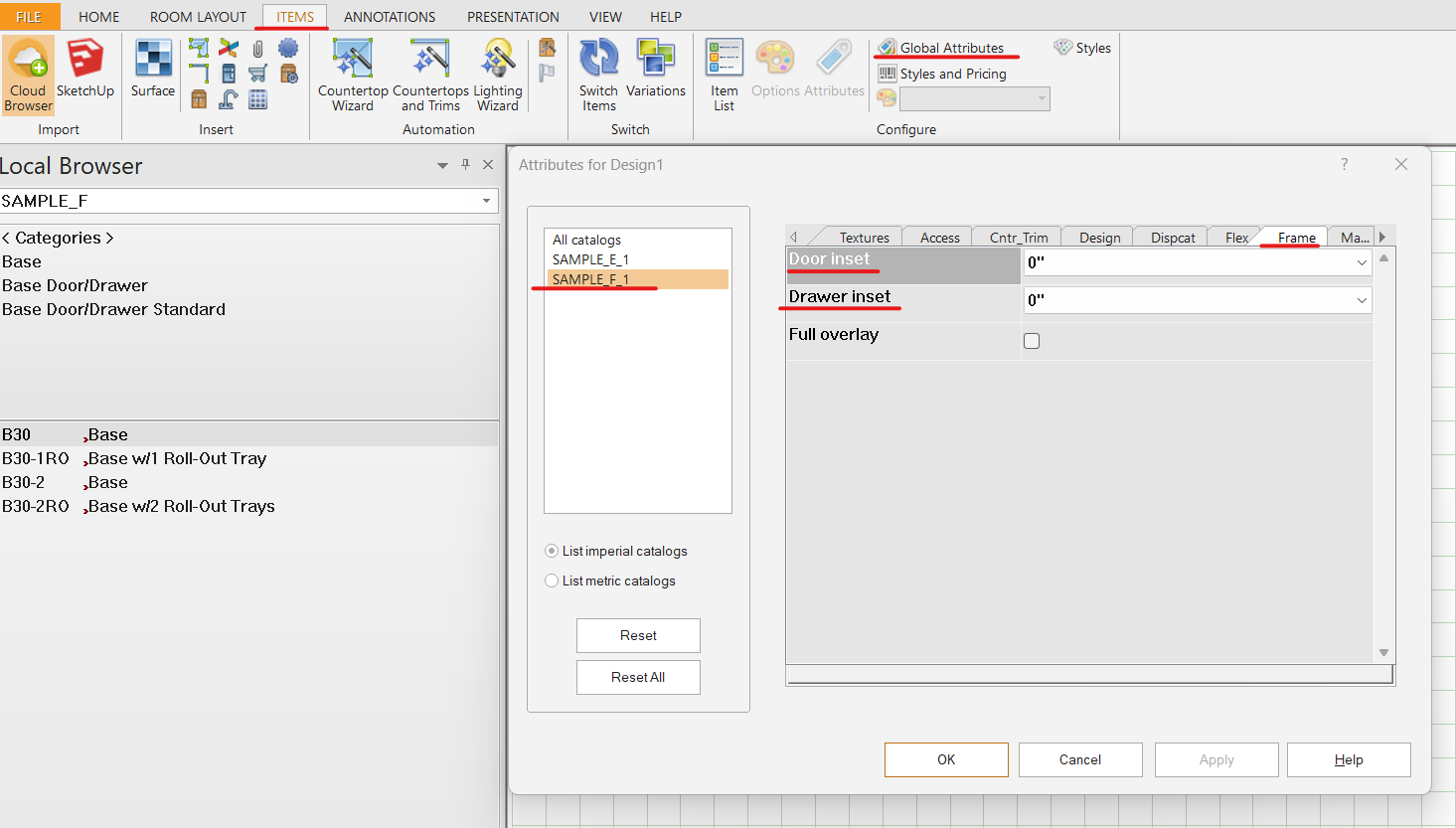
You can draw an inset door by using the SAMPLE_F catalog. Once you have your cabinetry on the floor plan, you can go to the Items tab and click on Global Attributes. In Global Attributes, select the SAPLE_F catalog on the left and then go to the Frame tab. In the Frame tab, you will have the ability to change the Door inset and Drawer inset.
Regards,
Kris
Attachments:
-
July 10, 2023 at 12:34 am #426433
Danielle Fleming
ParticipantHi, I’m in Australia. How can I inset drawers and doors with a metric library in Euro style cabinetry, ie. no face frame? Surely there is a way?
-
July 10, 2023 at 11:20 am #426498Participant
Hi Danielle,
You can only Inset framed cabinetry. The generic Metric catalog we have (SAMPLE_M) is a frameless series which cannot be inset. If you are using a framed metric catalog, then the steps written above should apply.
Regards,
Kris
-



You must be logged in to reply to this topic.