
-
-
February 4, 2022 at 6:46 pm #358384
 Erik TornquistParticipant
I know there must be a list of various keyboard shortcuts to perform varying actions but can’t find the list anywhere. Anyone have a link to them or some list?
Also, What is the key procedure to center a plan within the workspace and/or elevation?
One last question, has anyone else found the ‘search’ feature within 2020Space’s website very poor?
-
February 4, 2022 at 6:56 pm #358386
Kristopher Papaleo
ParticipantHi Erik,
Here is the article we have on Keyboard Shortcuts.
To center an elevation or a floor plan, you can either double click on the scroller on the mouse or you can click on ‘fit to window’ in the Home tab and then left click on the floor plan or elevation.
What are you trying to search on 2020spaces.com that may not be appearing? Im using Google Chrome and anything I search for comes up right away. Perhaps it may have something to do with the browser you are using? Let us know!
Regards,
Kris
-
February 4, 2022 at 8:30 pm #358387Erik TornquistParticipant
Hi Kris, thanks for the info. Thought everyone would be gone for the weekend and wouldn’t hear (read) back from someone until monday.
I don’t get it, I’ve searched ‘keyboard shortcuts’ before within 2020’s search bar but nothing would come up. At the moment I can’t recall whatever else I had searched for in the past that wouldn’t come up but sometimes what I was looking for WOULD come up only if searching within Google (or duckduckgo or whoever else) by inputting “2020spaces: (whatever it was i was searching for)” and that’s the only way I would receive accurate results. Next time it happens, I’ll send you a note just in-case. I usually use Firefox but jump between It and Opera browsers.
Guess I’ll be printing out that keyboard shortcut guide. But is there a list with every 2020design shortcut , not just “Most Frequently Used”?
Also knew about the double-clicking scroll wheel to zoom to fit but it stopped working earlier, which is why I had looked for that shortcut. Funny thing, I almost never use the Home tab, didn’t occur to me to look there.
Thanks again.
-
-
February 7, 2022 at 11:42 am #358452Participant
Hi Erik,
I’m happy to have surprised you with the information on Friday 🙂
Ah, I see the issue you ran into in the example you’ve given. The search bar on 2020spaces.com will only allow you to search for items from this particular website. For example, you tried searching for a Knowledge Center article on 2020spaces.com. Doing this will give you all the wrong results. The reason for this is because the article for ‘Keyboard Shortcuts’ does not live on 2020spaces.com, it lives in the Knowledge Center (knowledge.2020spaces.com).
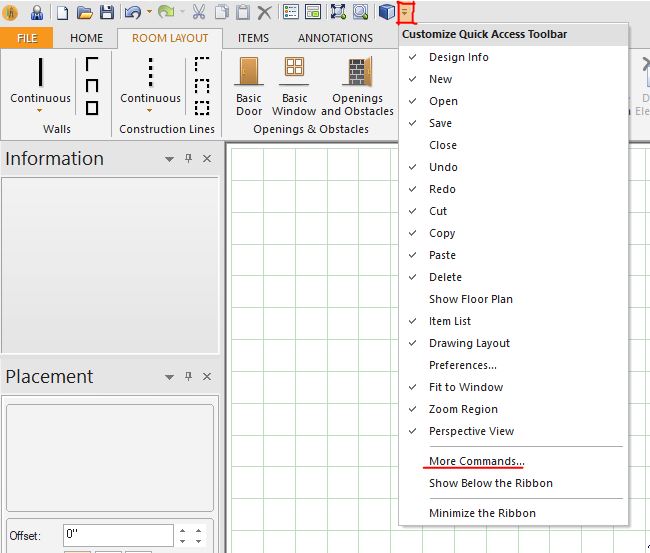
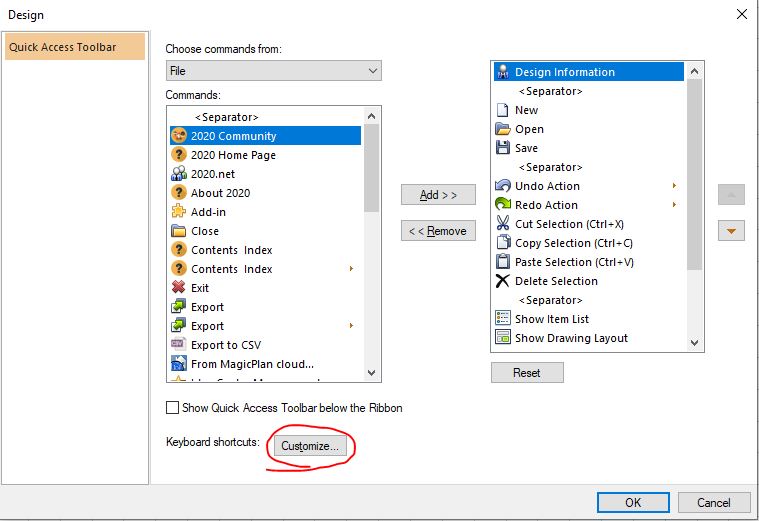
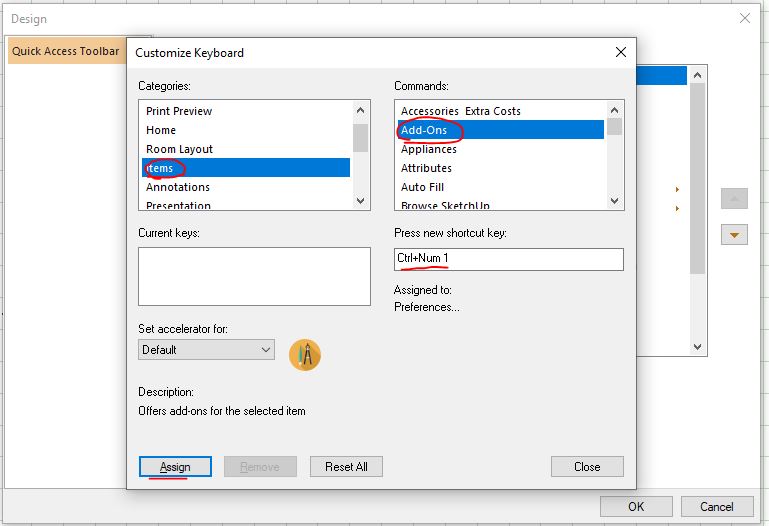
As for the shortcuts, the ‘Most Frequently Used’ is the only list I know of but we do offer the ability to create your own shortcuts. In the program, click on the ‘down arrow’ on the quick access toolbar and click on ‘more commands’. From there, you want to click on ‘customize’ next to ‘Keyboard Shortcuts’. -See Images. From here, you can select a category and then select a command. Once you do that, you want to left click in the box under ‘Press new shortcut key’ and then use your keyboard to enter in the shortcut you would want.
Hope this helps!
Kris
-

You must be logged in to reply to this topic.