
-
-
September 13, 2016 at 3:15 pm #100793
Shelby Simons
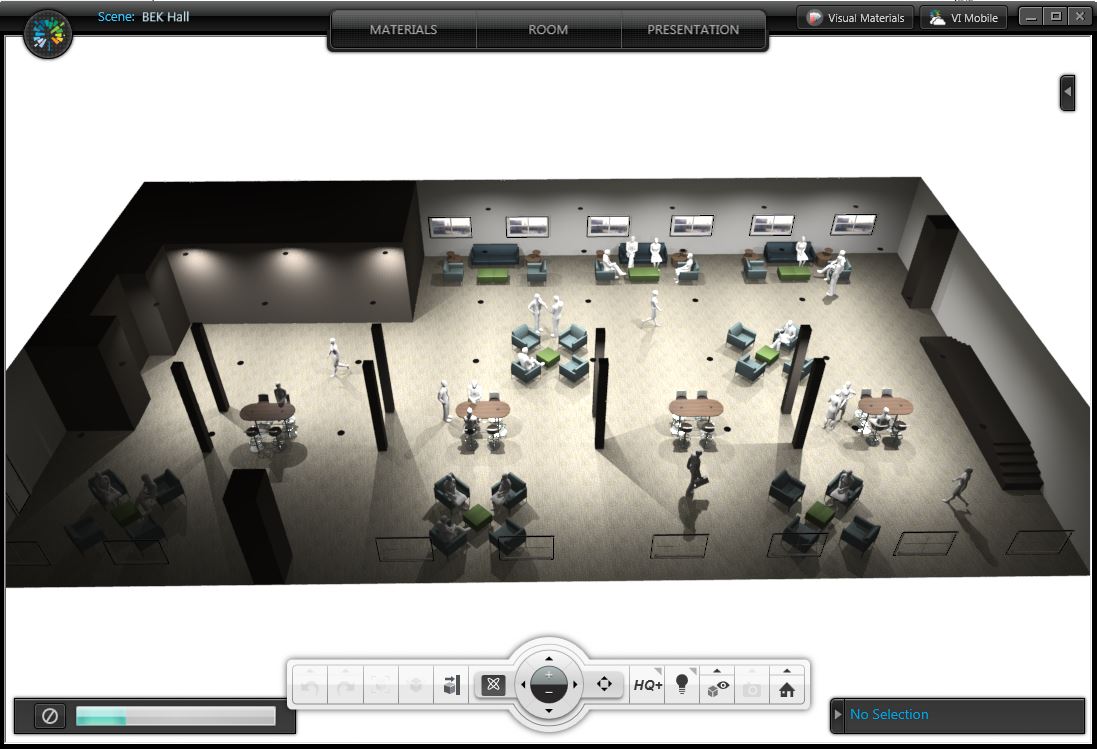
ParticipantI am a designer that works on large scale offices and am working on a 105′ X 55′ space. Unfortunately due to the lighting limit in the space certain areas are not lite. This is disappointing because when we go to present to our potential customers we are selling they are not able to see the space in its entirety due to the lack of lighting. I used the boundary lines but that still did not work. It would be helpful if we were not limited to a number of lights to light the space.
Attachments:
-
September 14, 2016 at 3:09 pm #100949
 Cindy Maple2020 Moderator
Visual Impression is excellent for users wanting to create high-quality renderings in a short amount of time. While Visual Impression can handle different sizes of projects, best practices for visualizing larger rooms or multiple rooms are to break your drawings up into areas of interest or zones that are easier to see and navigate. Individual lights added by the user are meant to be used to “accent” the default lighting and not meant to be used as an overall lighting source. Trying to use the individual lights as you are in a large room can cause unexpected results like you are seeing. Visual Impression is always improving based on customer feedback. I will document your findings and look for opportunities for improvements in this area. Thank you for using 2020 Visual impression and providing your feedback.
-
December 1, 2019 at 9:24 pm #260888
Mark Carlile
ParticipantHas anything been done to correct this issue? It’s very frustrating.
-
June 1, 2024 at 5:40 am #438574
ivy michael
ParticipantAddressing rendering lighting issues in a visualizer requires meticulous attention to detail. Adjusting parameters such as light intensity, direction, and shadows gout symptoms foot can significantly enhance the realism of the rendered scene. Additionally, optimizing materials and textures ensures accurate light interaction, ultimately elevating the visual quality and impact of the presentation.
-



You must be logged in to reply to this topic.