
-
-
October 6, 2016 at 12:25 pm #106196
DANIEL JONES
ParticipantHi
Please can anyone advise the best catalogue to produce a handleless kitchen design using the rail system? I will be getting the cabinets made bespoke so my suppliers catalogue isn’t in Fusion.
Thanks in advance
Dan
-
October 6, 2016 at 3:55 pm #106221
 Lukas -> www.szymtech.plParticipant
Hi Dan
What catalogues You have now?
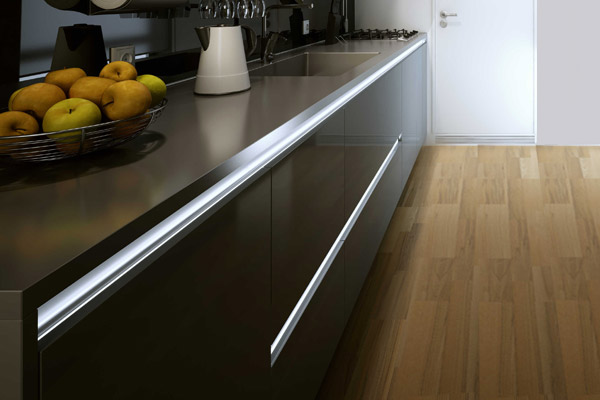
What do You mean by rail system? Like this in attached photo? There is an alu bar cutted into base caracase.
Attachments:
-
October 6, 2016 at 4:51 pm #106230Participant
Hi
Yes that’s the system. I’ve got crown imperial and just discovered that their Rialto range can be handless so think I have solved it now.
Thank you.
-
October 18, 2016 at 2:10 am #107218
Jeannine
ParticipantHi
Apologies for the delay in response
We also have Charles Rennie Mackintosh that has handleless ranges (Omega)
thanks
-
November 3, 2016 at 11:22 am #109686
 RichardParticipant
Just to poke my nose in on this one – I use the Universal Kitchens Cat for true handle-less, as it works superbly, especially as all of our units are bespoke as well.
To do this, I use the ‘Insert’ – ‘Non Standard’ Items function, and add units from the Universal kitchens cat available from the options in the drop down selectors.
For example, to add a 600mm wide full height base unit:
Insrt – Non Standard – Catalogue = Universal Kitchens – Drawing Group = Base Cabinets (Handleless) – Drawing num – 1. Set your dimension properties and add it in.
This process sounds long winded, but once you get used to doing it it really doesn’t take too long at all. Plus, you can specify Keyboard shortcuts in the options menu, so I’ve added a keyboard shortcut to make it much quicker. The results are well worth it. Check out my 360 panoramas in the gallery to see some examples like this one:
https://panorama.2020.net/view/tvcfsreesus4msaryfzgeq/
HTH in some way.
-



You must be logged in to reply to this topic.