
-
-
February 12, 2016 at 10:38 am #73325
James Barr
ParticipantI just got a new computer setup with much better specs than previous. My designs render much faster than before but the finished rendering seems hazy and lacks sharpness and definition. Wondering if it has to do with my graphics card, a GeForce GTX 960, not being on Redways list yet but it is certainly faster than most of the card on there. Although I did see that another user, Jordyn P, has the same card. Is this a problem that anyone else has had?
-
February 12, 2016 at 11:05 am #73328Participant
Right now I have 8 GB.
-
February 12, 2016 at 11:20 am #73331Participant
I can look into doing that. Just confusing that my previous set up which was an AMD Fx-6100 3.3 GHz, Radeon HD 7700, 8 GB ram, would make sharper renders but would take probably 5 times as long. Just for stating my current setup is now i7- 6700 @ 3.4, the GTX-960 , and 8 GB.
-
February 12, 2016 at 4:25 pm #73335
 Neil WilsonParticipant
Hi Guys,
The 960 is a good card but currently the redway rendering engine does not recognise it. This means that a lot of the rendering functions that would normally be handled by the card get soft rendered instead. That could definitely lead to Hazy renders.
Neil
-
February 12, 2016 at 4:30 pm #73337Participant
Hey Neil,
Thanks for the input. I was thinking that may have alot to do with it. Redway definitely needs to update the last supported driver is about a year old so its time. Hopefully its soon.
James
-
February 12, 2016 at 4:52 pm #73340
Jordyn P
Pilot ProHi Neil!
I emailed Redway and this is what they told me (even though it doesn’t make much sense):
Dear Ms Pennyfeather,This card is already supported by all REDsdk versions. It does not appear in our list because we have no driver recommendation for it, but this don’t mean that it’s not supported.
Regards,
Renaud Deparis,
REDWAY3D. -
February 14, 2016 at 8:10 pm #73692
 Mike LangensiepenPilot Pro
Hmmm, I saw no difference in renders between 8GB and 16GB of RAM. The i7 definitely dumps soft brown stuff over even the best AMD.
Surprisingly, the Surface tablet had one of the best render speeds I’ve seen. Wonder if Microsoft slow things down on non-Microsoft PCs or am I just being cynical.
-
February 18, 2016 at 1:28 pm #74977Participant
Hey Jordyn,
One other question since I know you have a similar setup. But it would be best to show a picture of difference. Am I missing something one how to load a picture on here?
-
February 18, 2016 at 2:06 pm #74982Participant
I will try to explain then. It is similar to the things we have been talking. The preloaded textures such as wood floors or wall paneling all appear pixelated and blurred even in the preview window when selecting. But I can load a custom texture and it looks just fine.
-
February 23, 2016 at 10:27 am #75688Participant
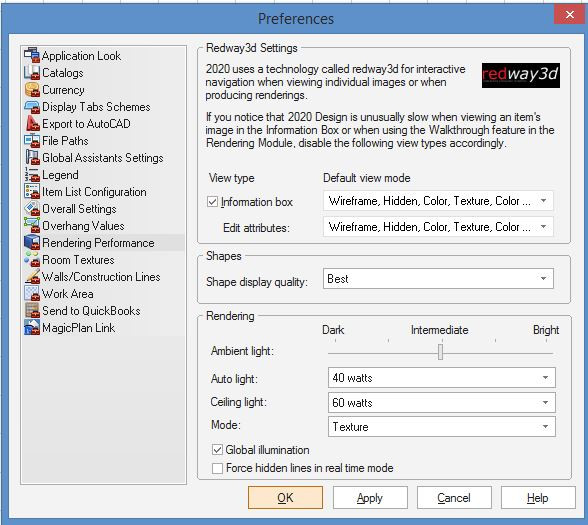
Just to update everyone. After spending over an hour with 2020 tech support and them giving me the conclusion that it was windows 10 and nvidia’s drivers, I spent some time looking around the preferences and found a box for shape display quality that was set to draft from install. Changing that to best fixed all problems. My renderings look like night and day now. Thanks for everyones input!
-
August 14, 2016 at 2:00 pm #98118
Bill Hart, AKBD
ParticipantHey James… so where was this box?
-
August 14, 2016 at 8:29 pm #98119Mike LangensiepenPilot Pro
Preferences, Rendering Performance, Shapes (in the midddle), Shape display quality
Set to Draft, Best or Normal depending on your graphics card/required rendering speed.
See attached screen capture
Attachments:
-


You must be logged in to reply to this topic.