Tiffany Gadway
Thank you so very much for the help, tips, screenshots and file, Mike….I have officially reset my registry and unfortunately, my issue continues. Sad face.
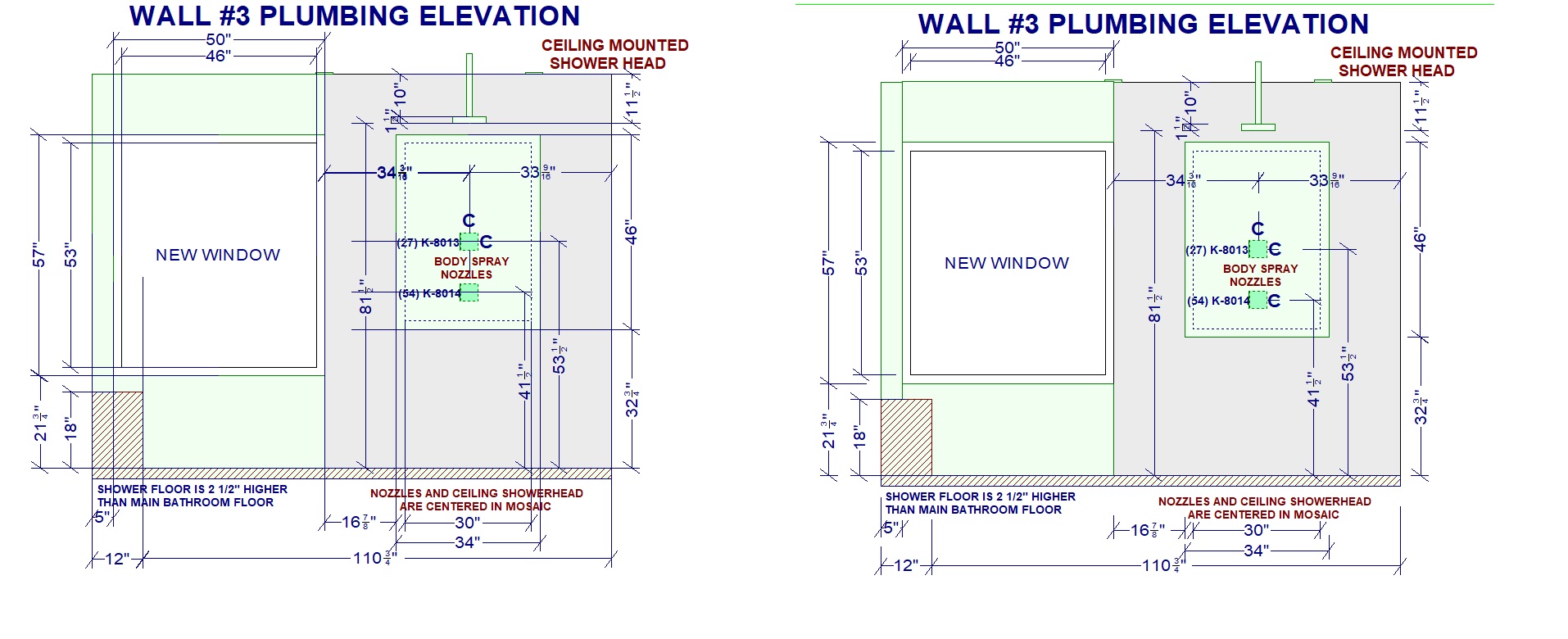
Now I wonder if the issue is related to my settings that are set for dimension lines. In the settings options, there is just a box that you either check or uncheck for “long extension” lines. Checking the box allows you to adjust the length of the extension lines to any desired length, which I do. Depending on what I am detailing, sometimes I need them sort, other times longer to better illustrate the information, so I have them checked as long and adjust them individually. But upon opening a file, those carefully, manually adjusted extension lines are all just super long all over the place, if not missing the whole dimension completely.
Maybe they just don’t work in 2020 the way I want them to and the way I have been accustomed to while working in AutoCAD? Can I not adjust them individually and have this saved? Is it all or nothing? Either all really short, or all really long? I would think they are able to be adjusted and saved that way, since it allows adjustments in the first place. I don’t know, but color me frustrated. 🙂 …a nice shade of green.
(I’ve attached a screenshot of what I get after opening a file on the left, and how I need them to be on the right) This file isn’t so bad, but the more detailed the drawing, the more cumbersome this becomes.
TYIA