
-
-
June 28, 2016 at 11:43 am #93888
 Santiago Morales2020 Expert
2020 Design V11.5 New Features
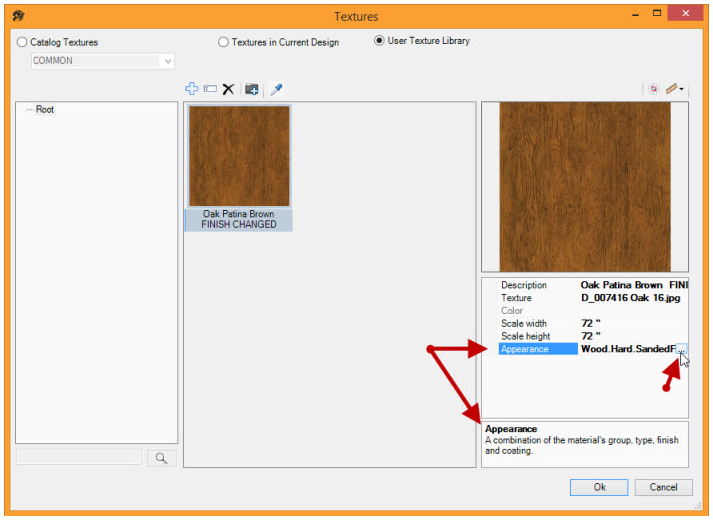
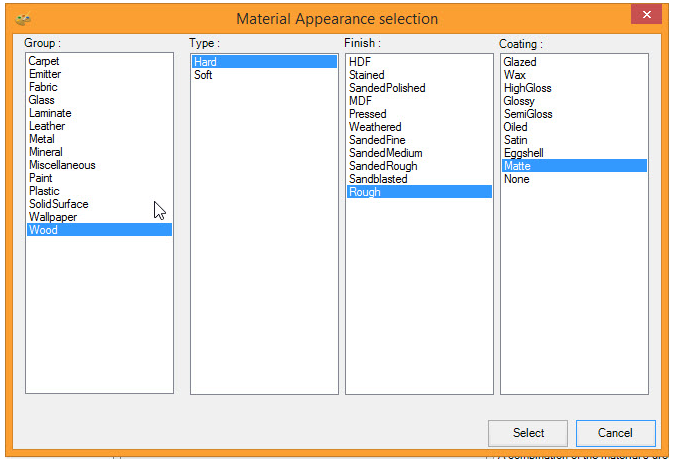
Ability to set the appearance of User Defined Textures
Upon editing a user defined texture, the user can update the group, type, finish or coating. This provides the possibility of better rendering quality by giving the user more texture appearance options.
Quick Rendering Refresh
Allows designs to be edited in the rendering window without performing an entire re-render each time, providing a better end user experience when editing designs.

Keep Rendering Window Visible
Provides the ability to keep the rendering window always visible. This allows for a better end-user experience when important design information needs to remain visible. This feature is ideal for users operating in a single screen environment.

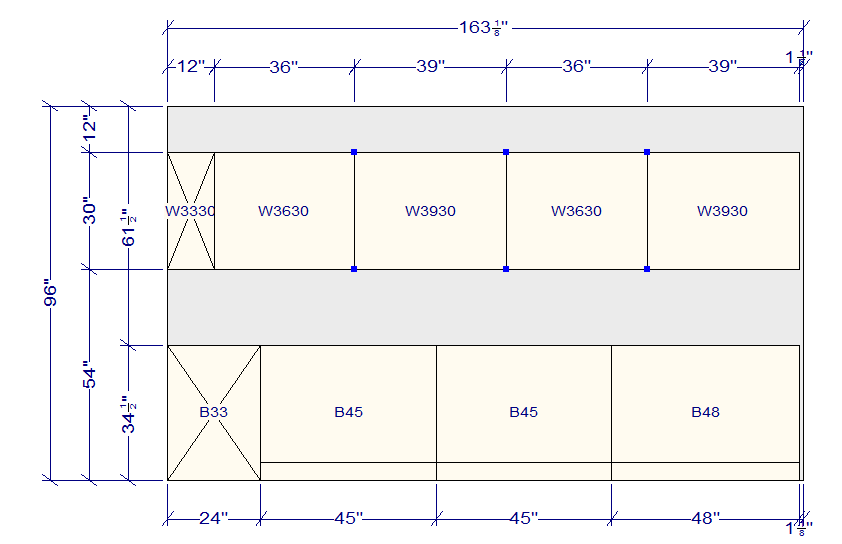
Select Multiple Items in Elevation View
This is a feature that has been brought back from a previous version. It allows for the selection of multiple items while in the elevation view, making it easier and faster to work with.

New Bounding Box for Selected Item in Rendering
When making a selection in the rendering window, a green bonding box now appears on a selected item when right clicking it. It is now clearer to the user which item has been selected in the design.

Lighting Wizard Customizations
It is now possible to customize the Graphical User Interface (GUI) of the Lighting Wizard. The customization is configurable per catalog manufacturer and allows manufacturers to create a Lighting Wizard interface that matches the options in their catalog.
Performance and Memory Enhancements
Several important improvements have been made to 2020 Design to reduce memory utilization, improve rendering times and stability.
-
June 29, 2016 at 2:02 pm #93983
tamra zajkowski
ParticipantI have tried and tried to get to a number of files and catalogs thru this site and it just sends me into a loop and I am not able to access the info. PLEASE HELP ME!!! This is super irritating
thx
tami
-
July 26, 2016 at 3:34 pm #96482
Richard Streloff
ParticipantQuestion on the new feature on User Defined Texture … I noticed this has wiped out the my pre-defined custom textures that worked in previous design versions? I can no longer choose a custom texture, for example changing one cabinet door texture to a custom texture I have built into the materials folder of my catalog. Why has this been disabled?
-
July 27, 2016 at 10:25 am #96502
 Neil WilsonParticipant
Hi Richard,
If you go into other catalogs like the Sample catalogs or another manufacturer does the same thing happen? I’m not experiencing the same issue with any of my catalogs. The first thing I would do is uninstall and reinstall the catalog in question. You can also go to the maintenance tools and run an update database to make sure that the catalog is properly registered with the software. If neither of these fixes the issue please don’t hesitate to call the 1-866-697-2020 support line and have a tech take a first hand look at the issue.
Neil
-
July 27, 2016 at 10:33 am #96504
 Danny SteigerPilot Pro
These are great features! Except they literally don’t work. It has destroyed my custom textures as well and I am unable to create new ones without them coming out looking like mirrors or black holes.
It would have been sufficient enough to be able to select the old custom wizard options for the texture library, no need to add a million different texture/material combinations. Stability would have been much more desirable.
-
July 27, 2016 at 11:47 am #96507Participant
Hi Neil,
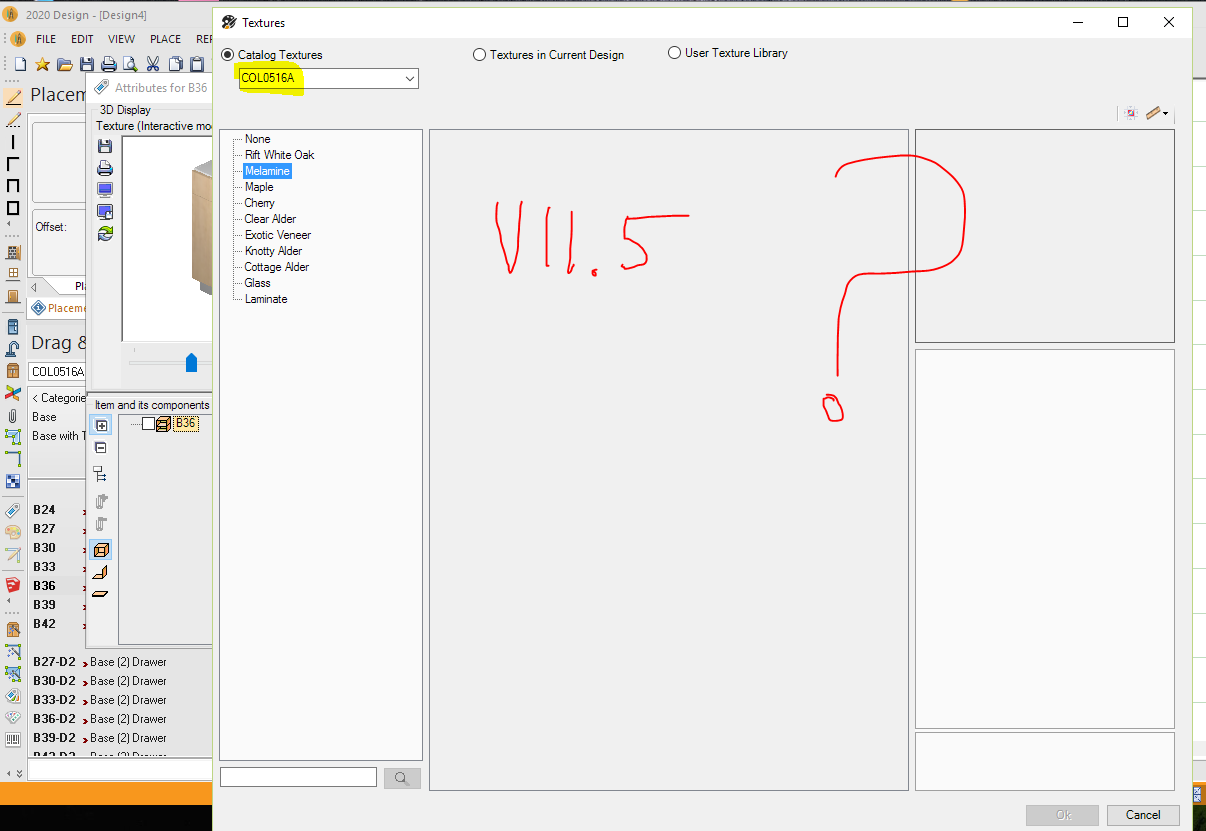
Thanks for your reply … but your Sample catalogs have “No” custom textures built into the catalogs? Other manufacturer catalogs with custom textures built into the materials folder have the same issue not visible in this V11.5.1.4 release. I did run the maintenance tool update database per your instructions, got my categories showing on the left, but no custom texture files? See attached …
Attachments:
-
July 29, 2016 at 12:09 pm #96771Santiago Morales2020 Expert
Hello fellow 2020 Design Users. Thank you for providing your feedback. It is very much appreciated.
I wanted to drop a few words and provide you with a small scoop: the latest release of 2020 Design (11.5.2) is just around the corner. Work has been done to address a lot of reported issues including the User textures appearing too dark.
The target date for 11.5.2 is scheduled for August 5th 2016.
Thank you,
Santiago
-
August 1, 2016 at 2:35 am #96803
 Mike LangensiepenPilot Pro
Hi Santiago,
I think we are all crossing fingers that 11.5.2 is more robust and bug free than the last one. Certainly a lot of us are losing patience and are at the point of cancelling support and maintenance payments (not a threat – we have just wasted so much time with upgrades and downgrades and lost sales due to the ongoing issues that we are understandably cynical).
Cheers
Mike
-
August 2, 2016 at 3:25 pm #96953Santiago Morales2020 Expert
Hello Mike,
I understand and appreciate your concerns. We will not presume our builds are flawles but we will constantly thrive to better our processes. I am grateful for your patience and fidelity.
Sincerely,
Santiago
-
August 2, 2016 at 7:27 pm #97125Mike LangensiepenPilot Pro
Hi Santiago,
Nobody expects builds to be flawless but software companies are expected to understand the processes behind alpha and beta testing and actual releases. Using the user base to help debug what are effectively Beta versions is NOT acceptable unless the product is labelled accordingly.
It would be far better to release Beta versions to a select group of volunteers and to have an approved bug reporting and fix system.
Please feed this back to senior management as it is resulting in a large loss of confidence in the product amongst your user base.
Cheers
Mike
-
August 5, 2016 at 2:01 pm #97447Neil WilsonParticipant
Hey everybody,
Just wanted to let you know that the tentative date for the release of version 11.5.2 has been pushed back from August 5th to no earlier than August 12th while they address a recently discovered issue with some catalogs.
Thank you
Neil
-
August 16, 2016 at 5:52 pm #98291
 susan Kemp, CKDParticipant
Ok, it is Aug 16th and still no release. We started converting over 50 licenses and I had our IT guy stop there were so many issues. it is bad when a major cab company isn’t even releasing their catalogs to work on V11.5 because of so many graphics problems which is what I am guessing is what you are referring to above. . I sincerely hope that V11.5.2 is way better.
And BTW, I volunteer to be a beta tester so we don’t have to go thru this again and again.
-
August 19, 2016 at 12:18 pm #98513
Lawrence Walsh
ParticipantIt’s the end of the week so….
The inability to modify cabinet sizes is really making it difficult for our designers in two of our major manufacturers. In some cases there is no work around.Really would like to see 11.5.2 today so we can test and release.
-
August 19, 2016 at 12:43 pm #98515susan Kemp, CKDParticipant
It’s the end of the week! When will we see a thoroughly tested and functioning 11.5.2?
-
August 30, 2016 at 10:13 am #99179
Jed Flemington
ParticipantAny idea when 11.5.2 will be released? I was told by support it would be friday Aug 26 and I still do not see anything.
-
August 30, 2016 at 10:25 am #99185
 EdithParticipant
Hello Jed
Version 11.5.2.11 was released last week.
It is available for download on our site: http://www.2020.netRegards
-
August 30, 2016 at 1:43 pm #99220Participant
Hello Neil,
Well … I’m “over the top” disappointed with 11.5.2.11 which I just installed on my test PC.
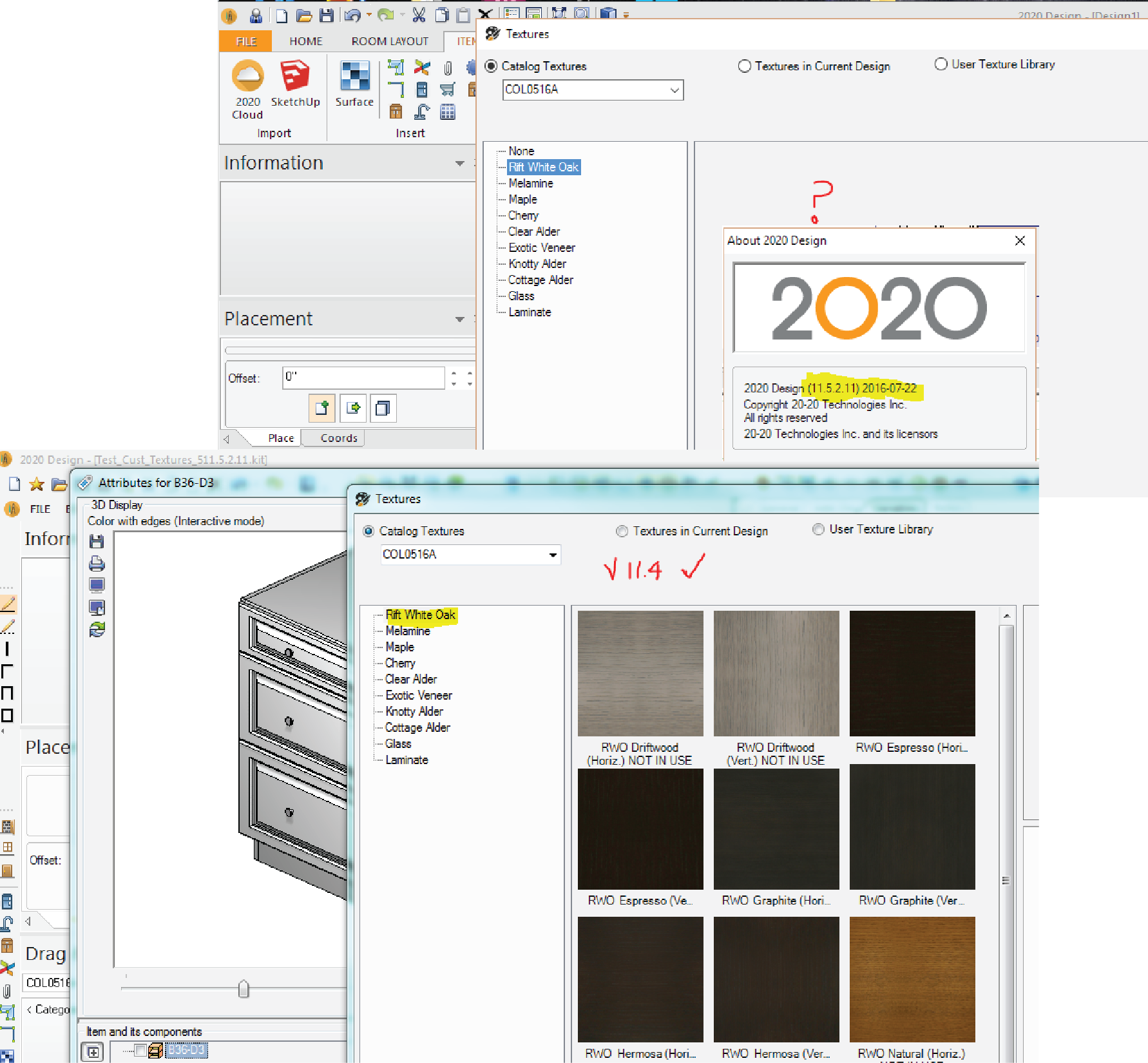
And totally frustrated to find out my custom textures that I have built in to my catalogs do NOT show up in this new release. Why?
Please have the programmers get rid of the “user defined textures” feature that is messing up our custom textures that we “Catalog Creators” have originally built into our catalogs.
I’m sure others will share their frustration! Back to V11.4 … see attached
-Richard
Attachments:
-
September 1, 2016 at 3:30 pm #99403Neil WilsonParticipant
Hi Richard,
I’m going with the assumption that you have built your own catalog using catalog tools and the textures you built into your catalog are not showing or not showing properly in version 11.5. In all honesty catalog tools questions are way outside my wheelhouse. However someone from the Content Services department should be able to address your concerns. Please send an email to residentialsupport@2020spaces.com to the attention of Content Services and I’m sure some there will be happy to contact you and take a look.Thank you
Neil
-
September 2, 2016 at 9:53 am #99412Participant
Hello Neil,
Thanks for the reply … I will send my concerns per your instructions.
Regards,
Richard
-
September 3, 2016 at 8:58 am #99508Participant
I have V11.5.2 Installed, Seems to have fixed my custom texture issue however I still get an error (Error # 85 Missing Item V3999) when I try to use a custom texture as a default. Ive reset the registry but no luck.. Any ideas?
Thanks
Jed
-
October 28, 2016 at 10:05 am #108191
Molly Olshefsky
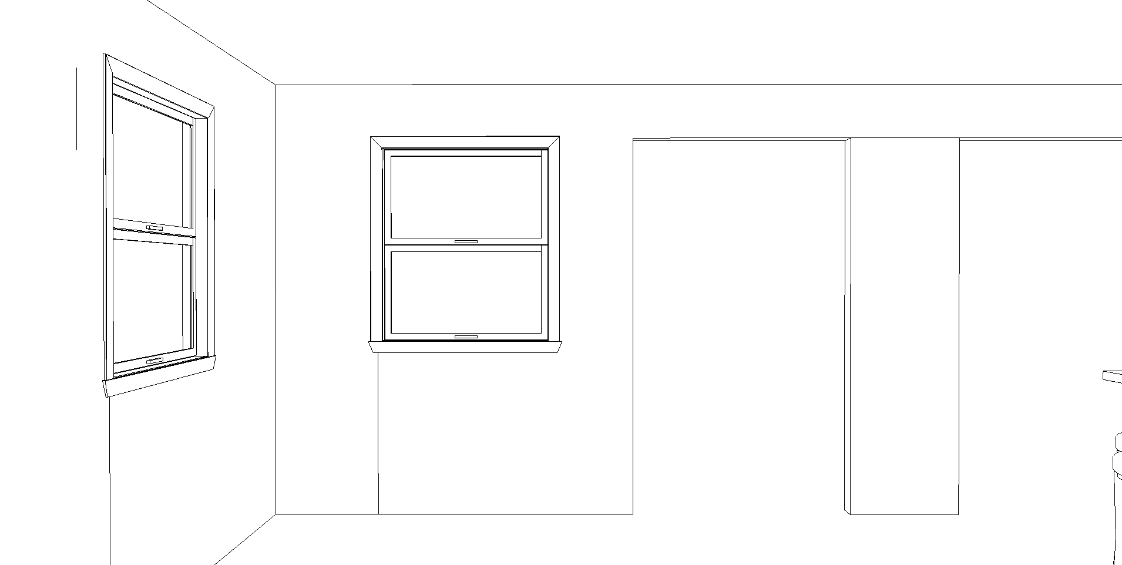
ParticipantWhen will you be getting rid of the line that goes down from a window, or the one between doors? I’m REALLY tired of dealing with them and whiting them out!
Attachments:
-





You must be logged in to reply to this topic.