
-
-
June 18, 2020 at 1:36 am #286402
Pauline Ribbans
ParticipantHi there,
Can anyone tell me how to use a background image but not have the line for its placement appear on the plan view?
Cheers Pauline
-
June 18, 2020 at 11:24 am #286416
Kristopher Papaleo
ParticipantHi Pauline,
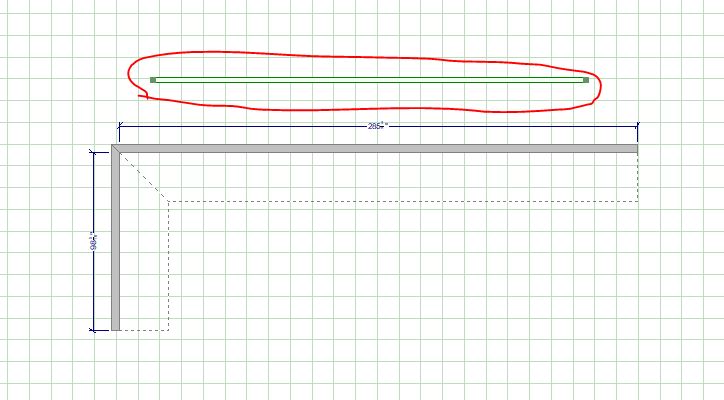
Im not sure if i fully understand the question, but ill try to answer it here. Are you talking about the physical item in the floor plan being visible? See attached file.
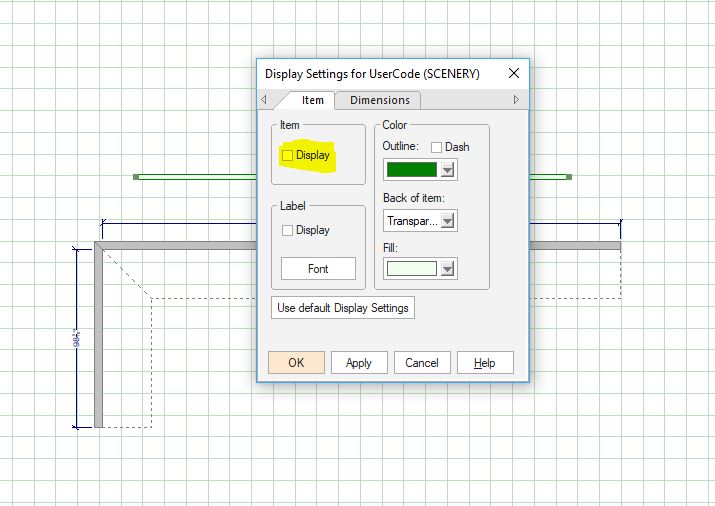
If this is what you are talking about, then you can right click on the scenery and go to “Display Settings” and remove its visibility by unchecking the “Display”. See attached file.
Regards,
Kris
Attachments:
-
June 19, 2020 at 2:49 am #286580Participant
Hi Kris,
Yes that is what I mean. I am unable to right click on the scenery though….
-
June 22, 2020 at 11:03 am #286929Participant
Hi Pauline,
If you are unable to right click on the Scenery then this could be an issue of the program registries. I would suggest to click HERE to see how to reset the registries of the program. Keep in mind when preforming a reset, it will put your preferences back to the default settings.
If this does not correct the issue then I would suggest to give our support a call at 1.866.697.2020.
Regards,
Kris
-
-
June 19, 2020 at 3:09 am #286581
 Roman ShParticipant
Hello!
As I understand, you are close to education, science and other directions. It is well. But, have you time for studying. If no, simply turn to this group of qualified professional essay-company.com, who are ready to assist your with writing students papers.
-


You must be logged in to reply to this topic.