2020 Navigation
  • Products
    • FOR KITCHEN & BATH DESIGNERS
      • Design Flex
      • Fusion Live
      • Design Flex catalogs
      • Fusion Live catalogs
    • FOR OFFICE DESIGNERS
      • Cap / Cap Complete / Giza
      • Visual Impression
      • Worksheet
      • Office catalogs
    • FOR MANUFACTURERS
      • Insight
      • Manufacturer catalogs
    • FOR ONLINE CONSUMER ENGAGEMENT
      • Icovia
      • Ideal Spaces
  • Solutions
    • Solutions for professional designers
    • Solutions for manufacturers
    • Solutions for online consumer engagement
    • Catalog content services
  • Support & training
    • TRAINING
      • Design Flex
      • Office
      • Insight
    • SUPPORT
      • Installation & system requirements
      • Contact support
      • Knowledge center
      • Community forums
    • RESOURCES
      • Blog
      • Catalog content
      • Testimonials
  • About us
    • Contact us
    • News
    • Careers
    • Customers
    • Partners
  • Store
    • Design Flex
      • Subscription
      • Additional subscription
    • Office
      • Subscription
      • Cap Complete
  • Sign in
    • Community forums
    •  Cyncly Account
    •  Sign in
    •  Register
  • EN
  • Search
  • Products
    • FOR KITCHEN & BATH DESIGNERS
      • Design Flex
      • Fusion Live
      • Design Flex catalogs
      • Fusion Live catalogs
    • FOR OFFICE DESIGNERS
      • Cap / Cap Complete / Giza
      • Visual Impression
      • Worksheet
      • Office catalogs
    • FOR MANUFACTURERS
      • Insight
      • Manufacturer catalogs
    • FOR ONLINE CONSUMER ENGAGEMENT
      • Icovia
      • Ideal Spaces
  • Solutions
    • Solutions for professional designers
    • Solutions for manufacturers
    • Solutions for online consumer engagement
    • Catalog content services
  • Support & training
    • TRAINING
      • Design Flex
      • Office
      • Insight
    • SUPPORT
      • Installation & system requirements
      • Contact support
      • Knowledge center
      • Community forums
    • RESOURCES
      • Blog
      • Catalog content
      • Testimonials
  • About us
    • Contact us
    • News
    • Careers
    • Customers
    • Partners
  • Store
    • Design Flex
      • Subscription
      • Additional subscription
    • Office
      • Subscription
      • Cap Complete
  • Sign in
    • Community forums
    •  Cyncly Account
    •  Sign in
    •  Register
  • EN
  • Search

Bottom Design Bar Empty

To Parent Forum
    • June 28, 2017 at 12:25 pm #137137
      Jason E.
      Participant

      I have a question.  We have one laptop in our office that seems to do odd things with 2020.   There are two things that have eluded me so far.

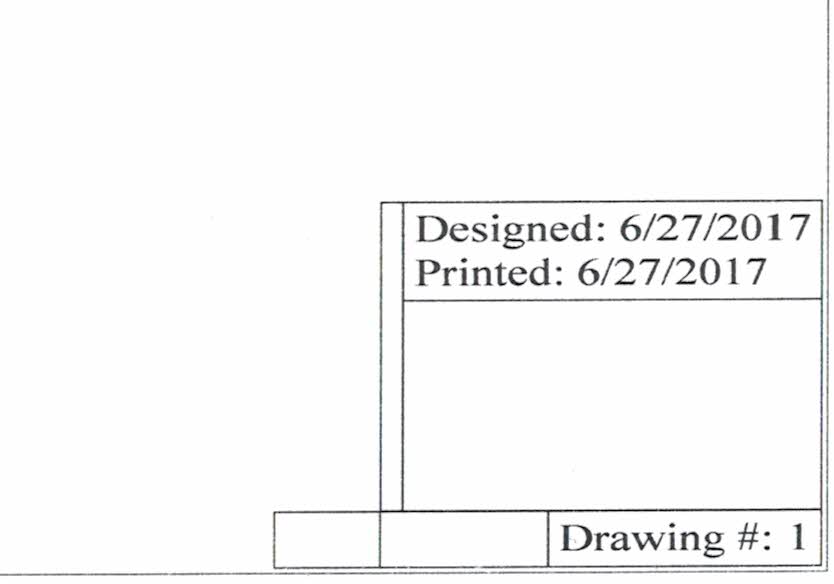
      1) The bottom bar, the space for the logo, the drawing name, advisory boxes are empty and shrunk.  See attached.

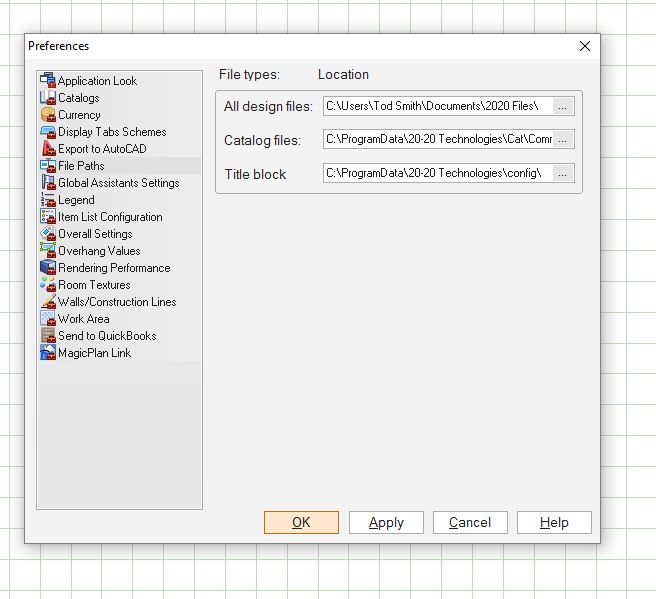
      2) The second is despite following the directions to the letter on how to change out the generic 2020 Logo it doesn’t change it.  Instead there was a screenshot of one of our business cards that was saved somewhere that I could never figure out.  I thought I found a logo path (see attached) but after verifying it was the right path it still wouldn’t work.

      Attachments:
      1. 2020-Glitch.jpg

      2. Logo-Path.jpg

    • June 28, 2017 at 9:38 pm #137262
      Mike Langensiepen
      Pilot Pro

      1) No idea on this – I’d try a registry reset and failing that a re-install.

      2) The logo file name is set in the print preferences. The actual location of the logo depends on the version you are using.

      In V11 it is in C:\Program Data\20-20 Technologies\Config    note that you may have to change your folder view options to make the Program Data folder visible.

      In V9 it is in c:\Program Files (x86)\20-20 Technologies\2020 Design\Config\60

      In both cases, the standard logo is called Logo.bmp and is a 200 x 200 image. You can change it to a jpg but it must still be 200 x 200

      Those locations also hold the text used in the plan, elevation and render prints.

      warnart.tx0
      warndes.tx0
      warndim.tx0

      I have a guide for editing those files here. Just substitute the location mentioned above if using V9.

      https://www.ipprofessional.com.au/files/CustomisingDesignPrints.pdf


    • July 5, 2017 at 10:42 am #137970
      Neil Wilson
      Participant

      @Jason – There was a bug with the title bar in either 11.6 or 11.7 – it has been resolved in 11.8.

      For the logo I have found the best way to change it is to have your image be a .bmp file that is 200×200 pixels in size. Name it Logo.bmp.  Copy that file into the appropriate config folder.  Thank you Mike for so neatly providing the paths 🙂 It will overwrite the 2020 logo and put yours in its place.  I like this method because even if you have to reset your registries the logo stays changed because the path never changes.

      Neil

    • July 5, 2017 at 8:36 pm #138110
      Mike Langensiepen
      Pilot Pro

      I’m writing a new command script that will backup the plan and elevation display settings including the standard logo file (which is why I prefer to overwrite the file as you have suggested Neil).

      The restore option will be a multichoice question as to what to restore.


    • July 6, 2017 at 2:09 am #138113
      Mike Langensiepen
      Pilot Pro

      A new version of my 2020 Settings Saver script is here:

      https://www.dropbox.com/s/jbwkpx6h2ptp2rk/V112020SettingsSaver.zip?dl=0

      Download and then extract the file to your desktop. When run, the script creates a directory on your desktop called 2020RESCUE and then asks you if you want to Backup or Restore

      Backup offers you a choice of registry setting and/or the config directory.

      Restore also offers the above choices.

      The registry backup is for your current drawing screen setup including toolbars etc. The config directory holds all the other settings including the display schemas, default logo file and much more.

      As always use at your own risk and I accept no liability for its use but I have tested on V11 on various Windows versions.

You must be logged in to reply to this topic.

Topic Tags2020 LogoDisplay Bar

Share this Post

2020 Community logo

2020 Community


2020 Knowledge Center

Need answers?

Find them in our new Knowledge center.


Partners

  • Partner Portal

2020 Cloud

  • 2020 Cloud - FAQs
  • 2020 Cloud - Two minute tips
  • Suggest a 2020 Decorative item

Forums

  • General Community Usage – For usage guidelines & profile queries
  • 2020 Pilot Programs
  • 2020 Design
  • 2020 Fusion
  • The Cube – everything to do with planning and furniture for offices and business spaces

Customer Center

  • Download and install
  • Training
  • Knowledge center
  • Community forums
  • Manufacturer catalogs
  • Cyncly Account
  • Cloud

About us

  • About us
  • Contact us
  • Careers
  • Blog
  • Privacy policy
  • Terms of use
  • Terms and conditions

2020 Solutions

  • Kitchen design software
  • Bathroom design software
  • Office interior design software
  • Furniture manufacturing software
  • Retailer interior design software
  • Academic program
FacebookXLinkedInYouTubeInstagramPinterest
2020 Cyncly Company Logo

2020 software provides end-to-end solutions for designers, manufacturers and retailers that can help you bring ideas to life, inspire innovation and streamline processes.

© 2014–2025 | 20-20 Technologies Inc. — All rights reserved

Toggle the Widgetbar