
-
-
October 22, 2019 at 9:57 am #254406
Lindsey Beck
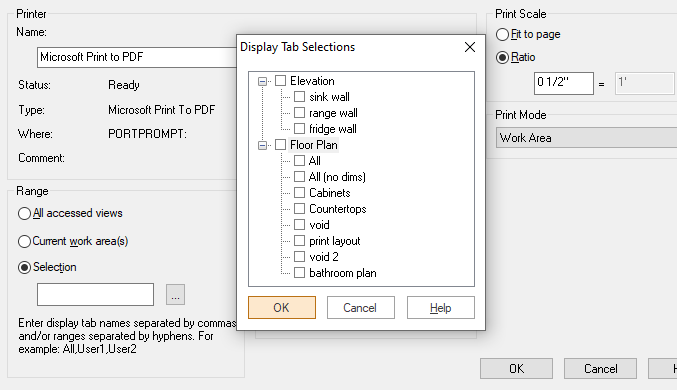
ParticipantIs there a way to change the order that 2020 prints drawings to PDF? When you select what you want to print (Elevations and/or floor plan pages) it always prints the elevations first. Is there a way to change this order so the floor plan shows up as the first drawing in the PDF?
Attachments:
-
October 22, 2019 at 10:04 am #254417
 Neil WilsonParticipant
Hi Lindsey,
I don’t believe there is a setting for that in the software. You might be able to have your PDF creator do it for you but that would depend on what you are using to create the PDFs.
Neil
-
October 23, 2019 at 4:09 pm #257542
Jeff White
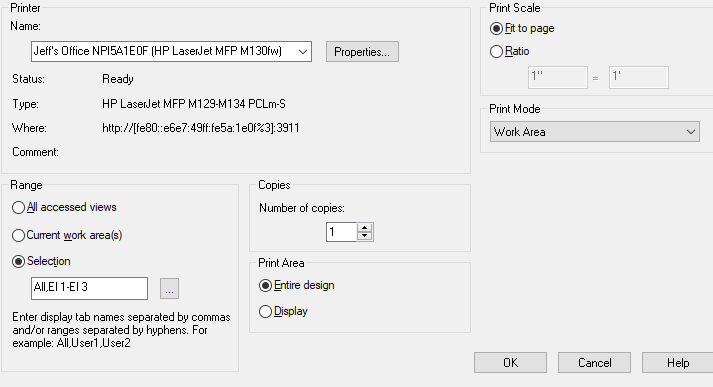
ParticipantYou can organize manually by checking the selection under the range. Example, click the elevations El 1-El 3 then manually type All (or any other tab name) in front of it, see attachment.
Attachments:
-
October 23, 2019 at 4:13 pm #257552Neil WilsonParticipant
That is super cool! Thanks for sharing Jeff.
Neil
-
October 24, 2019 at 7:39 am #257617Participant
Jeff thank you SO MUCH!!! I wish I had asked this MUCH sooner!
-
-
October 24, 2019 at 2:43 am #257616
 Mike LangensiepenPilot Pro
Hi Jeff, thanks for that – that has been a complaint of my Designers since forever! I wish I had known before.
-


You must be logged in to reply to this topic.