Glass Walls

    • May 27, 2019 at 9:38 am #239480
      Corinthian
      Participant

      Does anyone know how to show a glass wall?

      Thanks.

    • May 27, 2019 at 2:18 pm #239543
      Kristopher Papaleo
      Participant

      Hi Corinthian,

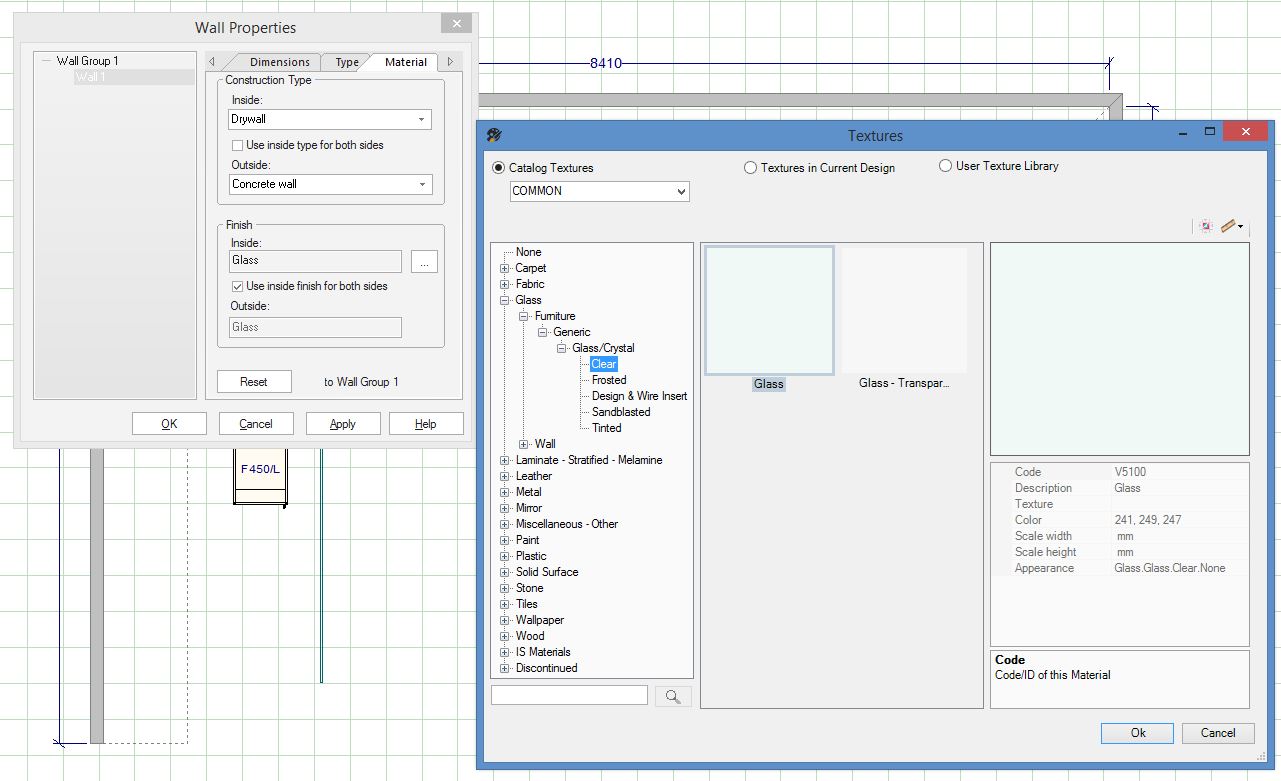
      To show that the wall is glass, you would be able to change the material of the wall by going into its properties. I hope this helps!

      Kris

    • May 27, 2019 at 7:16 pm #239583

      Draw the wall as normal. Right click on the wall and go to Properties, move to the “Material” tab at the top and change the Finish to Glass (see attached) and tick the box for Inside Finish to both sides.

      If the glass wall joins other walls then to avoid the odd joins that sometimes show up, use a panel sized accordingly or draw a line, Make 3D and change the finish. If you still need placement zones, just add construction lines in the same places as the panels.

      Attachments:

You must be logged in to reply to this topic.

Share this Post