
-
-
February 10, 2025 at 3:54 pm #440012
 Erik TornquistParticipant
Am I missing something but why is it lights, pendents, recessed ceiling lights, etc… don’t give off light anymore? I can adjust the color shade and lighting angle in Lighting Properties but no way to adjust intensity. No options for it in Cloud Configurator either.
-
February 24, 2025 at 5:57 pm #440271
 Craig ParkerParticipant
Not sure about your issue, but how are you editing the lighting angle of something like a puck (TASKLT21 catalog, L-PS-FR-3BA-27 light). I’m coming back to kitchen design after a 11-12 year hiatus, and was using something like this to light the kitchen. But I used no texture, so it didn’t show up in the rendering. Maybe I’ve got the wrong light now.
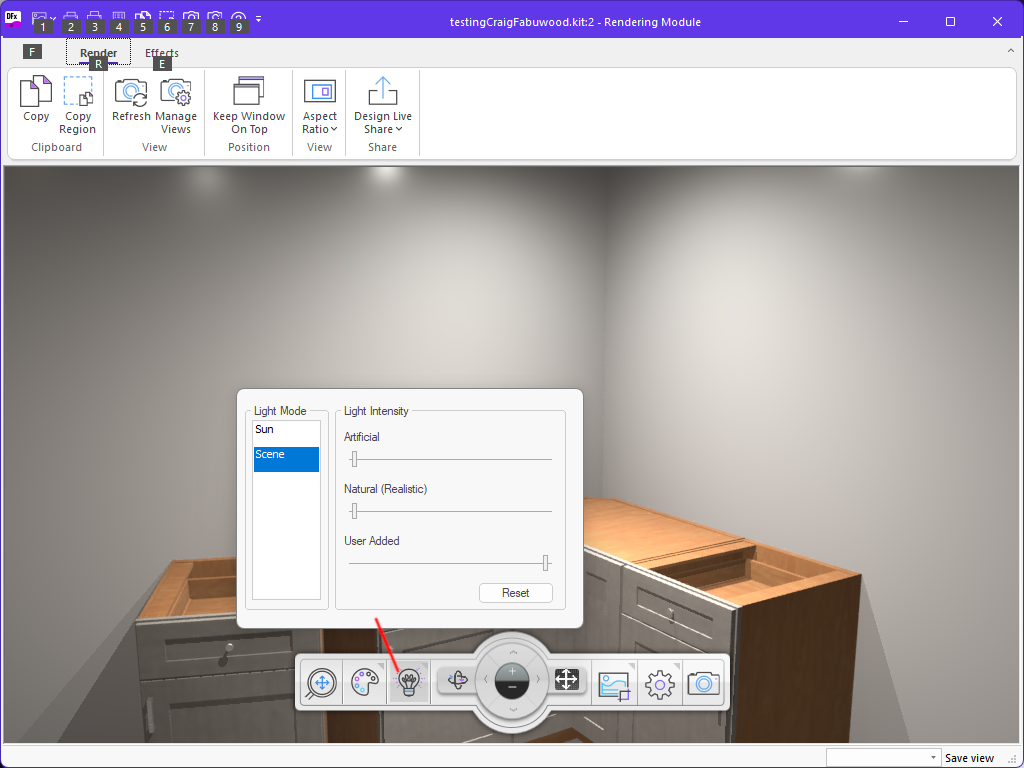
Possible answer to you… Have you shut down all lighting except user added stuff? I’ve been in this menu today (first day back) but can’t currently find it. There were three sliders, and I turned all but user added down, so all I’m seeing is lighting from the puck lights I’ve installed.
What are the ones you’re using? Maybe I can figure it out when I get done yelling at the pucks… -
February 25, 2025 at 8:33 am #440275Craig ParkerParticipant
Found it – in the rendering window, there’s a light bulb.
Attachments:
-
February 28, 2025 at 1:44 pm #440426
Joshua Hyatt
ParticipantI’m having this issue on the new 14.4 Cycles rendering. Undercabinet lighting is now showing up in the renders
-

You must be logged in to reply to this topic.