
-
-
August 1, 2018 at 1:46 pm #196569
Sandra Golds
ParticipantI am trying to create a multiple catalog library for fellow employees. I’d like to rename them and then ship to zip thru Catalog Manager so that someone else could install w/o having to rename so that they are all named the same. It seems to only get so far before asking for a password. Is this a feature I know need to pay for?
-
August 1, 2018 at 2:04 pm #196570
 Neil WilsonParticipant
Hi Sandra,
The password request in the ship feature in not requesting a password. It’s asking if you want to password protect your file. If you just leave it blank you should be able to continue.
Neil
-
August 3, 2018 at 2:08 pm #197149Participant
Neil,
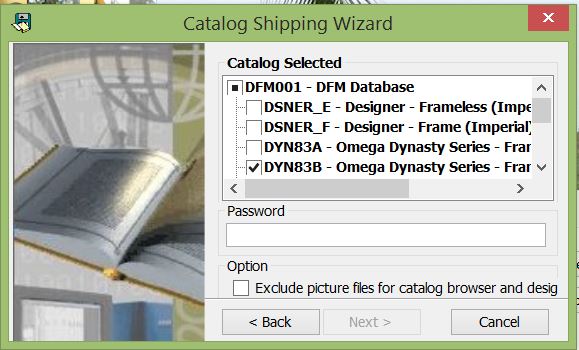
The “next” box is grayed out and I can’t select it, so I thought it had something to do with a password. If I don’t need / want a password do you have any thoughts on why I can’t continue?
Attachments:
-
August 3, 2018 at 2:52 pm #197169Neil WilsonParticipant
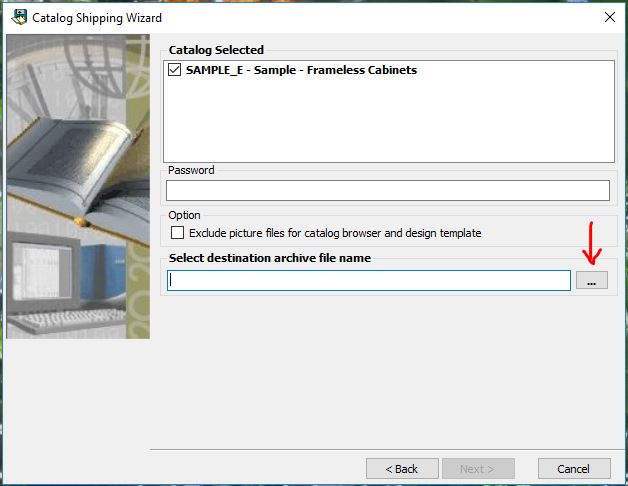
Thanks for the attachment, it explains a lot. That isn’t the full ship screen. You are missing the bottom half of the screen. If you can make that window bigger you will find the next line is asking you to select a destination folder and file name for the shipped catalog. When you fill that in you will be able to select “Next”.
If you can’t just drag the window larger you will probably need to change the resolution on your monitor to 1920×1080 to see it all. Right click on your desktop and select display settings and in the settings you should be able to change your resolution. You will then need sign out of Windows so the changes take effect.
Hope that helps.
Neil
Attachments:
-
August 3, 2018 at 3:11 pm #197188Participant
Perfect, that works!
Thanks
-

You must be logged in to reply to this topic.