
-
-
August 19, 2016 at 6:31 am #98512
Grant Hughes
ParticipantLoving fusion V5 so far and the background processing, but I do have a couple of suggestions.
My aim was to be able to export multiple views in HQ mode and be able to leave them running all day in the background. Trouble is I want them to be jpegs, and the only way to have a jpeg export at HQ resolution is to let it render within Fusion beforehand. Meaning I have to wait anyway before using the background export feature. I have gotten around this by testing my renders at preview setting and then printing them in the background to PDF, trouble with this method is that I end up with a dozen PDF files of renders and if I wanted to put these in a power point presentation it becomes difficult.
Would it be possible to patch in a feature that would allow me to change the render quality from the export screen? so that I for example can test the render in preview, then task the background processing to render the high quality images.
-
August 26, 2016 at 6:54 am #98898
 Jim Smalley2020 Moderator
Hi Grant,
Pleased to hear that you are enjoying Version 5 and the background processing feature in particular. Thank you also for your suggestion which is certainly a very interesting one and clearly would represent a time-saving enhancement.
Whilst I cannot make any guarantees regarding the implementation delivery of feature enhancements, this is one that I will be exploring further and adding to the future candidates list.
-
February 2, 2017 at 4:13 am #118939Jim Smalley2020 Moderator
Hi Grant,
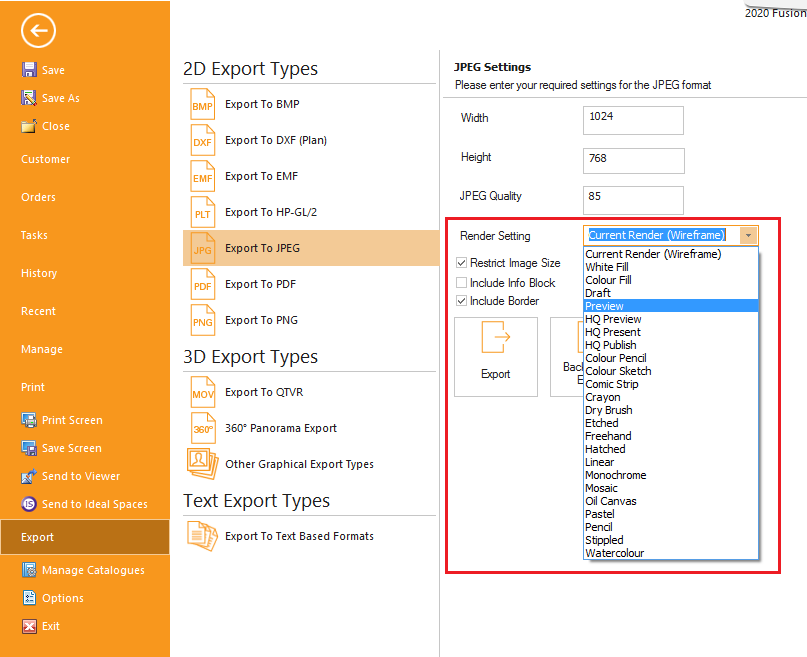
I am pleased to advise that we have indeed been able to accommodate this request and that the functionality that you proposed will shortly be available as part of the release of Version 5.4.0 within the next couple of days. Here is an extract from the updated ‘What’s New’ guide to 2020 Fusion Version 5 describing the feature:
NEW in v5.4! Ability to Define Image Export Render Setting (5.4)
2020 Fusion has the ability to export a design to a variety of formats. In version 5.4, this functionality has been further enhanced through the addition of an option to select the specific render type for qualifying export formats (BMP, JPEG, PDF, PNG and 360° Panorama) independent of that shown in the ‘design area’ of the active design.This time-saving measure means that it is no longer necessary to initially render the ‘design view’ before exporting the image. For example, the active design can be quickly rendered in ‘Wireframe’ in the design view and then a higher-quality render (e.g. ‘Preview’) can be selected at the point of export.
Thanks again for your input Grant, it is really very much appreciated – I hope the new functionality meets your expectations and delivers the time savings your were hoping for.
Attachments:
-
February 6, 2017 at 11:52 am #119106Participant
Thanks a bunch, I look forward to trying it!
-


You must be logged in to reply to this topic.