Search Results for 'perspective view'

  • In reply to: Laptop Recommendations

    July 18, 2016 at 3:25 pm #95780
    AllSouth
    Participant

    I agree with Mike Langensiepen.

    I would add that the Dell systems can have rendering glitches for more detailed design perspectives and textures.

    I have HP Pavilion i5 laptop with Windows7 from years back that is still handling 2020_v10.5 and all my Office software.  It actually works a bit better that the Dell office computer.  I look for any gaming setup with 17″ screen or capability to split screen.  Any increased dedicated processors are great.  CNET & Computer Shopper are good sources for reviews, etc.

    Topic: Display Cabinet Dimension Help

    June 3, 2016 at 4:32 pm #91059
    Irene
    Participant

    Hello,

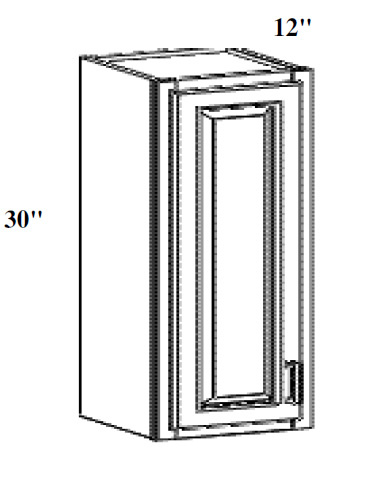
    My name is Irene, I am a newbie here. We are working on creating our product catalog and we plan to use 2020 drawings for this purpose. I wonder if there is any way to show cabinet dimensions on perspective view. Something similar to the picture attached?


    Any help will be greatly appreciated.

    Attachments:

    In reply to: How to add a window background.

    April 7, 2016 at 10:04 am #84330
    Neil Wilson
    Participant

    Hi Brenda,

    It might be that, once you place the scenery the openings and obstacles box comes back on the screen.  If you you click on the view button in the openings and obstacles wizard again after you have placed a scene it thinks you want to place another one and defaults back to the basic colour 25 (white).

    Place a scene, close the openings and obstacles wizard and check in a perspective to see if the scene you selected shows in the rendering.  If you are still getting a white background give the 1-866-697-2020 support line a call because that is not normal behavior for the software.

    Neil

    Topic: Cannot Find Floating Window

    April 1, 2016 at 2:33 pm #81914
    Susan Serra
    Participant

    I’m not sure what to call it, but the floating, small, window that you use to change the perspective direction or elevation wall suddenly went missing. I cannot figure out how to access it again. I cannot now change the current elevation and perspective views because I can’t find that floating window. Please let me know how to access it, thank you! I am using Fusion 4.5.1.10

    Edith
    Participant

    Have you ever wonder what is the easiest way to adjust the viewing position and angle (camera settings ) in floor plan view before you launch the Perspective View? Watch our new video to learn how!

    Edith
    Participant

    To learn how easy it is to adjust the viewing position and angle before launching a perspective view, watch our video!

    Topic: Printing out Perspective view Bigger

    March 4, 2016 at 4:22 pm #78355
    Paula Moynihan
    Participant

    I am trying to print out a perspective view on an 8 1/2 x 11 piece of paper, Landscape, with title block, and It comes so small compared to version 9 and also small to what is showing up on my screen.  I try to do a closer view, and it still prints out small!! Is there any way to fix it/make it take up more of the page?? It really is noticeable smaller… Any help is appreciated!! (I also have a JPEG of what i’m talking about, not sure how to upload though if that would help to explain what i’m trying to find a fix to!)

    In reply to: How to show\use the Camera in the floor plan

    November 30, 2015 at 1:47 pm #62775
    Jason
    Participant

    Always adjust the camera height and tilt:

    When using the camera feature on the floor plan , it is always a good idea to adjust the camera height and tilt before visualizing your design with perspective view because sometimes the default settings for the camera location will not give you the expected results.

    In order to change the camera height and tilt simply right click on the rectangular area of the camera  and select ‘camera height’ or ‘camera tilt’ from the menu. For the camera height, enter the desired height from the floor. For the camera tilt enter zero to have the camera parallel to the floor, enter a positive number to have the camera angled upwards and enter a negative number to have the camera angled downwards.

    Topic: Items Not Showing in 3D Perspective

    October 23, 2015 at 10:35 am #55762
    Audrey Ulishney
    Participant

    I have version 11.2 installed. I am working on a design and one or two cabinets are not showing up in my 3D perspective views although all the ones adjacent to them are. Using the same catalog.  They were there yesterday, but not today!

    Topic: Custom Backsplash

    August 28, 2015 at 5:38 pm #46081
    Kristi
    Participant

    I often have a backsplash with more complexity that just standard tile. It will have some sort of design or accent thrown in. I have in the past exported my 2020 drawing to Photoshop and then overlaid the backsplash to give a visual for my customer, but I would like to do this through 2020, so I don’t have to keep doing it for every perspective and so it can be seen in room viewer also. Does anyone have any tips on how to do this?