Search Results for 'perspective view'

  • Topic: Infinite floor and ceiling

    April 20, 2021 at 10:27 am #324419
    Daniel Serrano
    Participant

    I´m working on a room design with no open spaces between the walls (the space is enclosed by 4 connected walls), yet 2020 design is projecting an infinite floor outside of the room in the perspective view and I don’t know why. I tried checking the “Do not connect to ceiling” option in wall properties but it made it worst, now I also have an infinite ceiling that doesn’t match the walls’ height and the projection is bigger. Any ideas on how to fix this bug?

    In reply to: WishList

    March 1, 2021 at 1:26 pm #318096
    Michael Anderson
    Participant

    I would like to be able to hide individual walls from view without having to move them; nor adjust the camera to the point of an oddly skewed perspective.

    Topic: Nothing shown in Perspective view

    October 24, 2020 at 2:57 pm #302971
    Rob Waltemate
    Participant

    Not sure what happened but when I try to look at the perspective view, it shows nothing.  How to I reset the view?  Where did the cabinets go? LOL.

    Attachments:

    In reply to: WishList

    September 24, 2020 at 10:23 am #298666
    Daniel Rankin
    Participant

    We offer to our designers two identical catalogs named “A” and “B” catalogs so they can design two different combinations of cabinets in the same design.  With this ability they sometimes place or “Replace” cabinets out of the wrong catalog in which puts them in the wrong catalog when they send it over to be ordered.  Sales is asking if there is a way to color code the outline of the cabinets based on the catalog?  I was suggested to create a custom Scheme but all I have found that does is for the whole design, not catalog specific.  Our request is that this be an attribute that I can program from catalog tools for each catalog specific to be a different color or at least a Global Attribute in Design that can be changed for the specific catalog and not the whole design like the Scheme does.  Going through a whole designs two catalogs and setting each individual cabinet’s outline color is not something we expect a designer to do.  Also, once set if the catalog changes for that cabinet, say they “replace” it with a cabinet from the other catalog, it stays that color no matter what catalog it is from.  We do suggest to our dealers to view their perspective to catch the different colors but that is not always going to obvious depending on the color choices made, and I am sure not always done.  Plus reviewing the reports before submitting the order!!  Thanks.

    In reply to: Thermador Update Now Available in 2020 Cloud

    September 18, 2020 at 12:09 pm #297403
    Kristopher Papaleo
    Participant

    Hi Peggy,

    I have tested drawer hood on my computer and I was able to see it in elevation, the floor plan, as well as the perspective view. I believe this to be an issue related to your program and I would suggest that you contact our Support by calling 1.866.697.2020. They can help by taking a look to see what the issue may be.

    Regards,

    Kris

    Topic: Panoramic 360 – Invalid Token

    March 27, 2020 at 5:51 pm #275554
    Kristen Randall
    Participant

    I am trying to save my perspectives as a panoramic 360 view, and my program appears that it is doing it correctly until the very end, when I get an Invalid Token error.  Can anyone help me understand how to fix that?  Thank you very much!

    Kristen

    In reply to: WishList

    March 18, 2020 at 4:34 pm #274625
    Jim Knowles
    Participant

    First – I rather like the 2020 V12 edition. However, I have found myself spending a massive amount of unnecessary time accomplishing relatively simple tasks that I’ve been able to do fairly easily in other more rudimentary kitchen design software programs. Some of the limitations are a bit astounding and very frustrating.

    1. Moldings on walls which are different heights on two ends. For example, cannot show crown molding on a wall which is 120″ on left side, and 96″ on the other side. Crown and other moldings will only appear in a straight line at one up/down value above the floor.

    2. Ability to edit trim, general shapes and lines in the elevation view. Can currently create a running line in an elevation, but cannot make it 3D, as would be expected for #1.

    3. Calculations within a dimensions field – for a length (or width, or height, or depth, or up/down, in/out value) being able to type ” 36+25.5+3″ in the field and it calculate/populate the box with 64.5. This is possible and quite handy in Photoshop, InDesign, etc.

    4. Please fix crashes while making changes while rendering window is open. Modifying or editing trims, countertops, walls, particularly the L/W/H/D of these items causes unexpected crashes.

    5. Ability to select which walls will appear in a floorplan view when creating document layout, or ability to turn specific walls on or off (like other items) in the various floorplan display tabs. Case here is when laying out a kitchen and then trying to add walls around it for perspective/flooring/windows/etc. to make it look real. Those walls and added items are not needed for creating dimensioned floor plan documents.

    6. Ability to select individual items to turn on or off in the rendering view.

    7. Ability to save lighting presets, and low/medium/high render quality. Lighting presets in all of the rendering views appear unnaturally dark. Cannot save or re-load an “exposure” value, or type a specific decimal number in this field. Cannot save presets for ambient light levels, auto lighting, etc. Cannot adjust height or general placement/frequency of auto lighting. Without spending hours to create manual lighting/light sources, it is virtually impossible to have upper cabinets, which have auto lighting, show up in the same color family as base cabinets, without hours of work.

    8. Ability to set contrast settings (white point, black point, shadows highlight/lowlight) in the rendering view. All white colors look unnecessarily dim and essentially a dark gray from the start. Under “auto” lighting, a bright white should appear as a bright white in a commonly lit room. The starting point in the rendering feels like a dark room in the back of a night club. Colors selected in any of the texture items for attributes appear 10+ shades darker in the rendering, but even with exposure and standard tweaking (before hours of adding custom lighting sources), items are either “flashed” out, very dark, or the color family is changed based on the lighting color temperature. It does not need to be that difficult.

    9. When will export to .dxf and .dwg be added for 64bit version? Cannot modify / create fully custom cabinets or anything else for that matter if the import/export does not work.

    10. Countertop wizard. Ability to add a custom overhang to a cabinet or edge, in the same way that appliance or finished edges are added. Ability to create custom-shaped tops using the same catalogs available in the countertop wizard. Difficult to create an oddly-shaped top with complex radiuses, etc. but very easy to do if you make one from scratch. Except that the countertop catalogs and textures are not available.

    Topic: v12 PERSPECTIVE

    January 23, 2020 at 12:43 pm #265404
    Carl S.
    Participant

    Hello,

    In using V12 perspective mode is there either a way to make Hidden View the default mode when viewing in perspective? Or is there a way to keep it in hidden mode once you make the change. It seams to always default back to a rendered color mode.

    Thanks!

    In reply to: Decorative Catalog – What do you think?

    October 4, 2019 at 10:10 am #251832
    Ariana Thompson
    Participant

    Thanks Erik!  LOL!  So it isn’t just me!

    I think I’ll do what I did with the recessed lights – do a full layout in a kit file of all the lights in the cloud – so I can click perspective and view all of them in a fake “room”. Just so I can see them!


    Cheers!

    Ariana

    In reply to: WishList

    May 8, 2019 at 10:38 am #236592
    Denis Perez
    Participant

    I think its a matter of maximizing the usage of the available graphic card. I dont know why it has to be constantly refreshing like that. And definetly realtime raytracing will be amazing. Like if they incorporate game engine features you will get something that looks like its prerendered and close what VRay its capable of. That is why I suggest they should explore changing their rendering engine all together and letting us have more control over objects and textures (rotate textures easily, scale objects in the perspective 3D view, add drag and drop textures, do some polygon modifiers (add bevel to surfaces more more realism, UV adjusting etc) will make 2020 a monster and it will shake the industry all together. Hopefully this things could be implemented soon…one mor thing realtime measurements (when I scale objects in the 3D view measurements get adjusted). I love 2020 and hope to see this features soon.

    Topic: How do you work in 2020 Design?

    May 7, 2019 at 6:46 pm #236539
    The Laminex Group
    2020 Partner

    A question I’m putting out there to better understand the common use of the software in business, but also how we can tailor the solution to better meet your needs.

    We provide the software to roughly 400 hundred users in our part of the world, though we don’t use it ourselves for design we often sit with designers and teach how to use it features and maximise on all the tools available.

    Often the scenario is as follows:

    1. Customer would like a new kitchen and would provide the room dimensions.
    2. Designer would ask a series of questions to understand what type of kitchen the customer is after, this might include their budget, type of cabinetry and its finish, counter-top, colour scheme if any, and so on. Designer may also show some previous work (high quality renders) or quickly design in 2020 Design if proficient.
    3. Designer might include his or her recommendations based on the type of space and customer’s preference to the above. Then ask that they schedule a time in future to review concepts (in 2020 Design or emailed) for the work to be carried out.
    4. At this point on presentation of the concept work (perspective rendering, panoramic view possibly), there might be some adjustments and back and forth before a final design is decided, here often a final price (2020 Design quote report) and time-frames are determined (Is this where the use of 2020 Design stops?). Here the designer might receive a deposit for the design work to be finalized and submitted for production (2020 Design application integration tool). Any issues in production or along the way will be communicated back to customer.
    5. Business may arrange delivery and/or installation at customers premises, final payment will be required for the entire project.

    Where do you start and stop with 2020 Design in the above process?

    And Why! does it not work in gaps of the above process for you?

    Cheers team

    In reply to: GPU Acceleration

    March 21, 2019 at 4:55 pm #230754
    Neil Wilson
    Participant

    Hi Nick,

    Right now 2020 uses the GPU primarily for the “Active” renderings.  The basic perspective, the previews in the attributes, anything you can rotate or view.  The HD renders are handled primarily by the CPU.

    Integrating new technologies is something that is always possible but I don’t believe that there are currently any plans for those specific ones.  They are really new.

    Neil

    In reply to: WishList

    March 21, 2019 at 3:31 pm #230750
    Santiago Morales
    2020 Expert

    Hello Erik,

    Thank you for your feedback.  I took note of your suggestion.

    In the mean time, I suggest you double click the middle mouse button on an elevation.  This should automatically resize the content.  Please note you can also use this capability in a perspective view.

    I am not sure what you mean about opening up more than one design.  This is possible within 2020 Design.  You can even tile multiple opened design by clicking the “Arrange All” button in the “view” tab.

    Thank you,

    Santiago

    In reply to: Raised or split level floors

    February 12, 2019 at 3:48 am #226705
    Ollie Farrant
    2020 Expert

    Hi Leigh,

    As it stands, the only way to have split/raised floor levels is to insert a box as you mentioned.

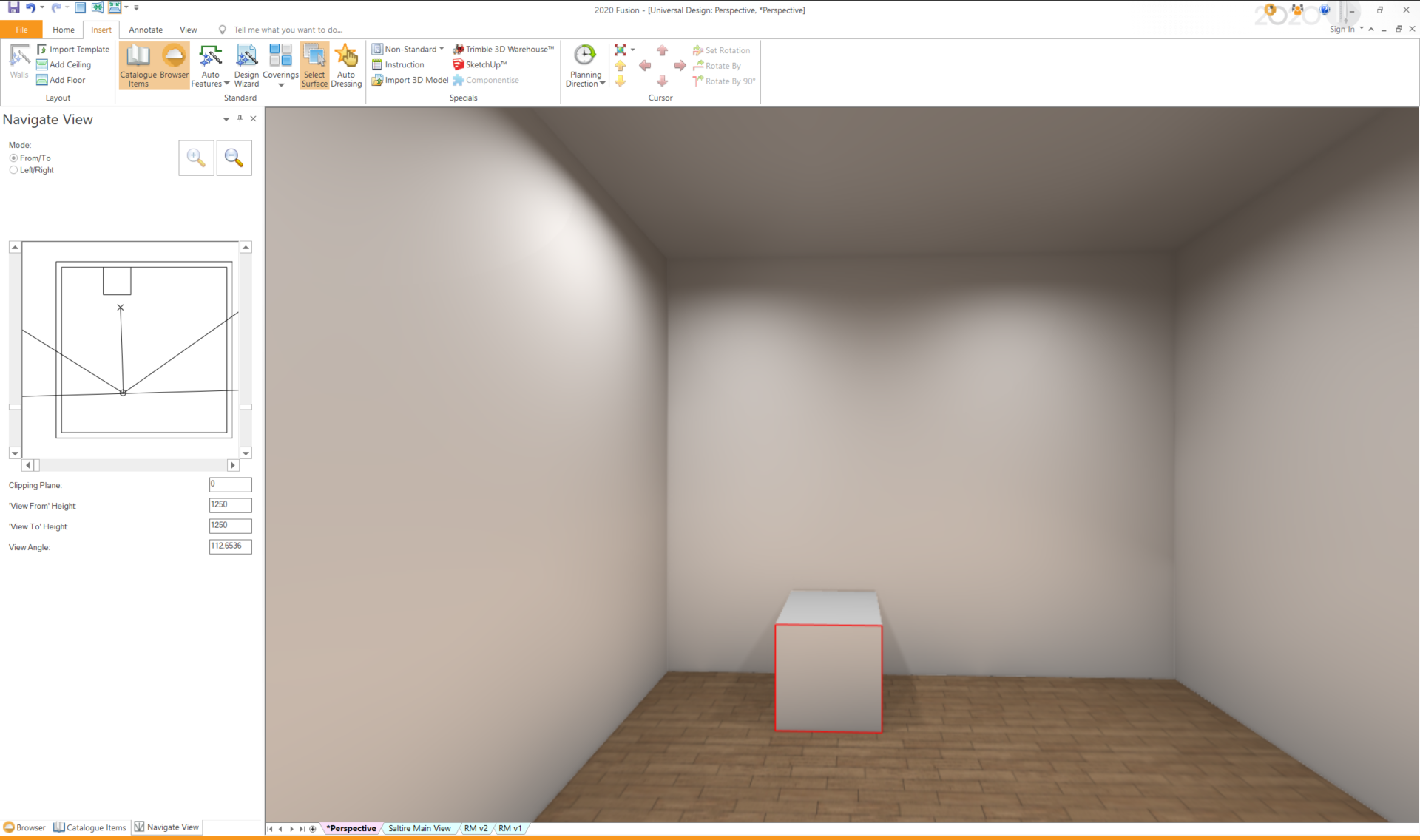
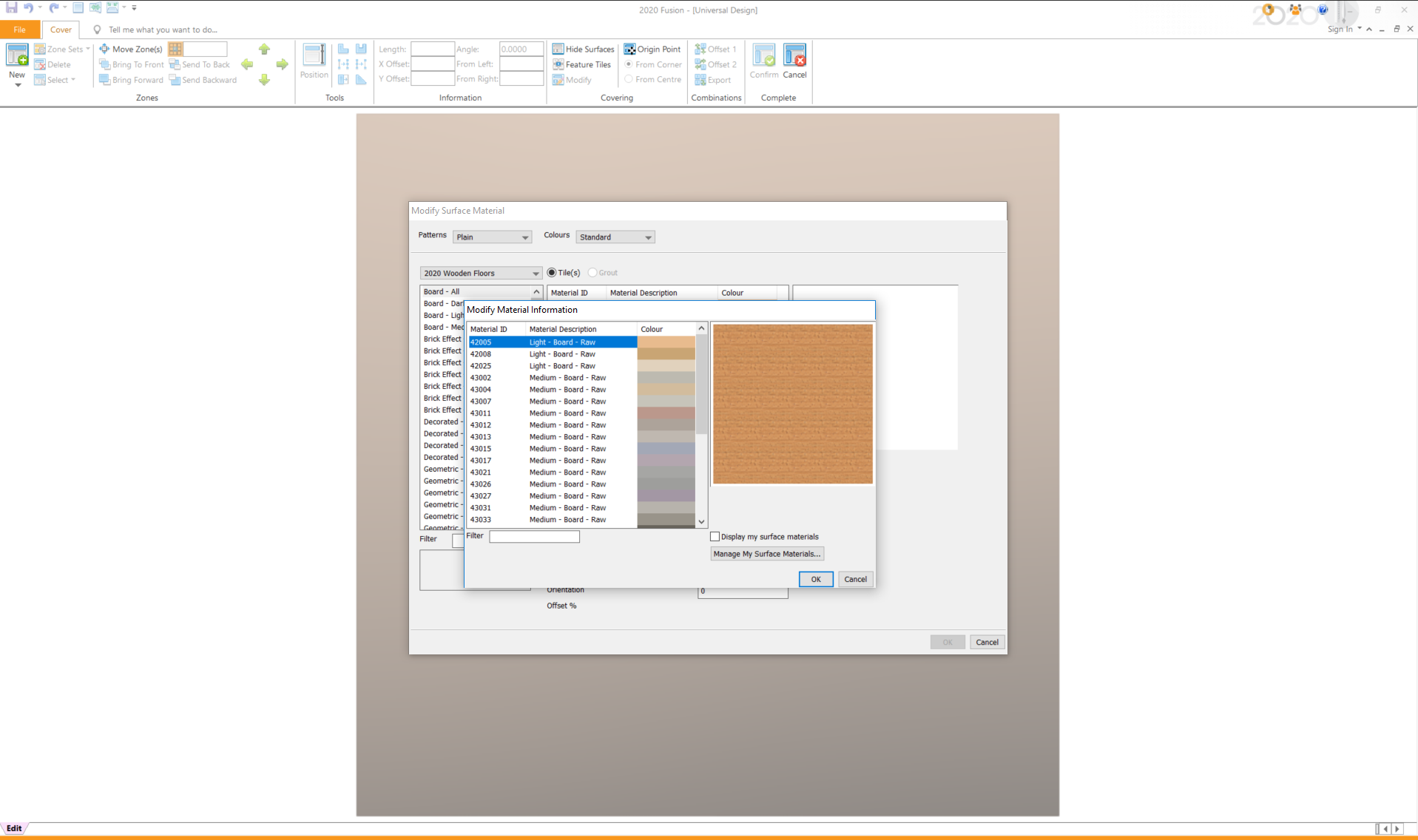
    You can tile a box via the coverings feature, please follow these steps:

    1. View Tab > Perspective
    2. Insert Tab > Select Surface > Select the face of the *Box you wish to apply tile to
    3. Insert Tab > Coverings > Item Surface
    4. Within the “Modify Surface Material” screen, click Add > select your tile/material > OK > Confirm

    See attached screenshots.
    Thanks!

    Caitlyn Lake
    Participant

    Hi there,

    I’m having an issue where whenever I change anything in the floor plan view, the perspective will change to wireframe view and will not change to any other view. I have to exit and reopen the perspective view each time I add to the project.